
Restrict access to data
مهم
This tutorial is an extension of the Server framework 101 tutorial. Make sure you have
completed it and use the estate module you have built as a base for the exercises in this
tutorial.
So far we have mostly concerned ourselves with implementing useful features. However in most business scenarios security quickly becomes a concern: currently,
Any employee (which is what
group_userstands for) can create, read, update or delete properties, property types, or property tags.If
estate_accountis installed then only agents allowed to interact with invoicing can confirm sales as that's necessary to create an invoice.
با این حال:
نمیخواهیم اشخاص ثالث بتوانند مستقیماً به املاک دسترسی داشته باشند.
Not all our employees may be real-estate agents (e.g. administrative personnel, property managers, ...), we don't want non-agents to see the available properties.
Real-estate agents don't need or get to decide what property types or tags are available.
Real-estate agents can have exclusive properties, we do not want one agent to be able to manage another's exclusives.
All real-estate agents should be able to confirm the sale of a property they can manage, but we do not want them to be able to validate or mark as paid any invoice in the system.
توجه
ممکن است در واقع برخی یا بیشتر این موارد برای یک کسبوکار کوچک خوب باشد.
Because it's easier for users to disable unnecessary security rules than it is to create them from nothing, it's better to err on the side of caution and limit access: users can relax that access if necessary or convenient.
گروهها
همچنین ببینید
The documentation related to this topic can be found in the security reference.
راهنمای کدنویسی document the format and location of master data items.
هدف
در انتهای این بخش،
میتوانیم کارمندان را real-estate agents یا real-estate managers کنیم.
کاربر
adminیک real-estate manager است.We have a new real-estate agent employee with no access to invoicing or administration.
It would not be practical to attach individual security rules to employees any time we need a change so groups link security rules and users. They correspond to roles that can be assigned to employees.
For most Odoo applications 1 a good baseline is to have user and manager (or administrator) roles: the manager can change the configuration of the application and oversee the entirety of its use while the user can well, use the application 2.
این مبنا برای ما کافی به نظر میرسد:
Real estate managers can configure the system (manage available types and tags) as well as oversee every property in the pipeline.
Real estate agents can manage the properties under their care, or properties which are not specifically under the care of any agent.
In keeping with Odoo's data-driven nature, a group is no more than a record of
the res.groups model. They are normally part of a module's master data, defined in one of the module's data files.
As simple example can be found here.
Exercise
Create the
security.xmlfile in the appropriate folder and add it to the__manifest__.pyfile.If not already, add a
'category'field to your__manifest__.pywith valueReal Estate/Brokerage.Add a record creating a group privilege with the id
groups_privilege_real_estate, the name "Real Estate" and the categorybase.module_category_real_estate_brokerage.Add a record creating a group with the id
estate_group_user, the name "Agent" and the group privilegegroups_privilege_real_estate.Below that, add a record creating a group with the id
estate_group_manager, the name "Manager" and the group privilegegroups_privilege_real_estate. Theestate_group_managergroup needs to implyestate_group_user.
توجه
Where does that category comes from ? It's a module category.
Here we used the category id base.module_category_real_estate_brokerage
which was automatically generated by Odoo based on the category set in the __manifest__.py of the module.
You can also find here the list of
default module categories
provided by Odoo.
نکته
Since we modified data files, remember to restart Odoo and update the
module using -u estate.
If you go to and open the
admin user ("Mitchell Admin"), you should see a new section:
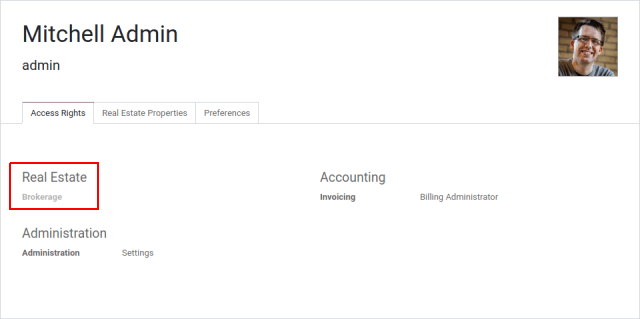
کاربر admin را بهعنوان Real Estate manager تنظیم کنید.
Exercise
Via the web interface, create a new user with only the "real estate agent" access. The user should not have any Invoicing or Administration access.
Use a private tab or window to log in with the new user (remember to set a password), as the real-estate agent you should only see the real estate application, and possibly the Discuss (chat) application:
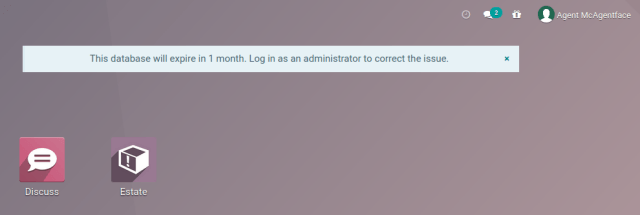
Access Rights
همچنین ببینید
The documentation related to this topic can be found at Access Rights.
هدف
در انتهای این بخش،
Employees who are not at least real-estate agents will not see the real-estate application.
نمایندگان املاک قادر نخواهند بود انواع ملک یا برچسبها را بهروزرسانی کنند.
Access rights were first introduced in Chapter 4: Security - A Brief Introduction.
Access rights are a way to give users access to models via groups: associate an access right to a group, then all users with that group will have the access.
For instance we don't want real-estate agents to be able to modify what property types are available, so we would not link that access to the "user" group.
Access rights can only give access, they can't remove it: when access is checked, the system looks to see if any access right associated with the user (via any group) grants that access.
group |
create |
خواندن |
بهروزرسانی |
delete |
A |
X |
X |
||
B |
X |
|||
C |
X |
A user with the groups A and C will be able to do anything but delete the object while one with B and C will be able to read and update it, but not create or delete it.
توجه
The group of an access right can be omitted, this means the ACL applies to every user, this is a useful but risky fallback as depending on the applications installed it can grant even non-users access to the model.
If no access right applies to a user, they are not granted access (default-deny).
If a menu item points to a model to which a user doesn't have access and has no submenus which the user can see, the menu will not be displayed.
Exercise
فایل access rights را به این شکل بهروزرسانی کنید:
به گروه Real Estate Manager خود دسترسی کامل به همهٔ اشیاء بدهید.
به نمایندگان (کاربران real estate) فقط دسترسی خواندن به انواع و برچسبها بدهید.
به هیچکس حق حذف املاک را ندهید.
Check that your agent user is not able to alter types or tags, or to delete properties, but that they can otherwise create or update properties.
هشدار
Remember to give different xids to your ir.model.access records
otherwise they will overwrite one another.
Since the "demo" user was not made a real-estate agent or manager, they should not even be able to see the real-estate application. Use a private tab or window to check for this (the "demo" user has the password "demo").
Record Rules
همچنین ببینید
The documentation related to this topic can be found at Record Rules.
هدف
At the end of this section, agents will not be able to see the properties exclusive to their colleagues; but managers will still be able to see everything.
Access rights can grant access to an entire model but often we need to be more specific: while an agent can interact with properties in general we may not want them to update or even see properties managed by one of their colleagues.
Record rules provide that precision: they can grant or reject access to individual records:
<record id="rule_id" model="ir.rule">
    <field name="name">A description of the rule's role</field>
    <field name="model_id" ref="model_to_manage"/>
    <field name="perm_read" eval="False"/>
    <field name="groups" eval="[Command.link(ref('base.group_user'))]"/>
    <field name="domain_force">[
        '|', ('user_id', '=', user.id),
             ('user_id', '=', False)
    ]</field>
</record>
The دامنههای جستجو is how access is managed: if the record passes then access is granted, otherwise access is rejected.
نکته
Because rules tends to be rather complex and not created in bulk, they're usually created in XML rather than the CSV used for access rights.
قاعدهٔ بالا:
Only applies to the "create", "update" (write) and "delete" (unlink) operations: here we want every employee to be able to see other users' records but only the author / assignee can update a record.
Is non-global so we can provide an additional rule for e.g. managers.
Allows the operation if the current user (
user.id) is set (e.g. created, or is assigned) on the record, or if the record has no associated user at all.
توجه
If no rule is defined or applies to a model and operation, then the operation is allowed (default-allow), this can have odd effects if access rights are not set up correctly (are too permissive).
Exercise
Define a rule which limits agents to only being able to see or modify properties which have no salesperson, or for which they are the salesperson.
You may want to create a second real-estate agent user, or create a few properties for which the salesperson is a manager or some other user.
Verify that your real estate manager(s) can still see all properties. If not, why not? Remember:
گروه
estate_group_managerبایدestate_group_userرا در بر داشته باشد.
بازنویسی امنیت
دور زدن امنیت
هدف
در پایان این بخش، نمایندگان باید بتوانند فروش املاک را بدون نیاز به دسترسی صدور فاکتور تأیید کنند.
اگر بهعنوان مشاور املاک تلاش کنید ملکی را بهعنوان «فروختهشده» علامتگذاری کنید، باید با خطای دسترسی مواجه شوید:
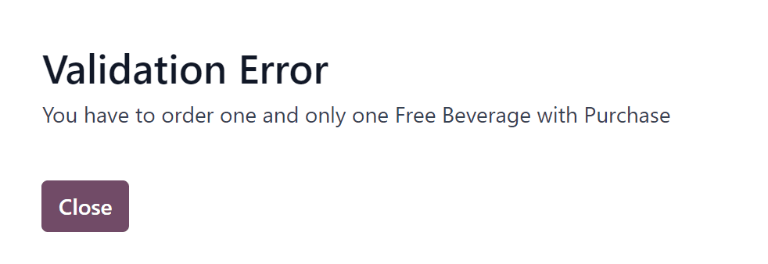
این اتفاق به این دلیل رخ میدهد که estate_account در طول این فرایند تلاش میکند فاکتوری ایجاد کند، اما ایجاد فاکتور نیازمند دسترسی به تمام مدیریت فاکتور است.
ما میخواهیم نمایندگان بتوانند یک فروش را بدون داشتن دسترسی کامل صدور فاکتور تأیید کنند، که این یعنی نیاز داریم بررسیهای امنیتی معمول Odoo را دور بزنیم تا یک فاکتور ایجاد کنیم علیرغم اینکه کاربر فعلی حق انجام این کار را ندارد.
دو روش اصلی برای دور زدن بررسیهای امنیتی موجود در Odoo وجود دارد، چه بهصورت عمدی و چه بهعنوان یک اثر جانبی:
متد
sudo()یک مجموعهرکورد جدید در «حالت sudo» ایجاد میکند، که تمام حقوق دسترسی و قوانین رکورد را نادیده میگیرد (هرچند بررسیهای گروه و کاربر کدنویسیشده ممکن است همچنان اعمال شوند).اجرای کوئریهای خام SQL، حقوق دسترسی و قوانین رکورد را بهعنوان یک اثر جانبی از دور زدن خود ORM دور میزند.
Exercise
هنگام ایجاد فاکتور، estate_account را بهگونهای بهروزرسانی کنید تا حقوق دسترسی و قوانین را دور بزند.
خطر
این ویژگیها عموماً باید اجتناب شوند و تنها با احتیاط فوقالعاده استفاده شوند، آن هم پس از بررسی اینکه کاربر و عملیات فعلی واقعاً باید بتوانند اعتبارسنجی معمول حقوق دسترسی را دور بزنند.
عملیات انجامشده در چنین حالتهایی باید تا حد امکان به ورودی کاربر کم وابسته باشد و آن را تا حداکثر حد ممکن اعتبارسنجی کند.
بررسی برنامهنویسیشدهٔ امنیت
هدف
در پایان این بخش، ایجاد فاکتور باید بدون توجه به تغییرات در estate، در برابر مسائل امنیتی مقاوم باشد.
در Odoo، حقوق دسترسی و قوانین رکورد فقط هنگام انجام دسترسی به دادهها از طریق ORM بررسی میشوند، مثلاً ایجاد، خواندن، جستجو، نوشتن یا حذف پیوند یک رکورد از طریق متدهای ORM. سایر متدها لزوماً در برابر هیچ نوع حقوق دسترسی بررسی نمیشوند.
در بخش قبلی، هنگام ایجاد فاکتور در action_sold، قوانین رکورد را دور زدیم. این دور زدن میتواند توسط هر کاربری بدون بررسی هیچ حق دسترسی انجام شود:
در
action_soldدرestate_accountقبل از ایجاد فاکتور یک print اضافه کنید (چون ایجاد فاکتور به ملک دسترسی پیدا میکند و بنابراین یک بررسی ACL را فعال میکند) مثلاً:print(" reached ".center(100, '='))
باید reached را در لاگ Odoo خود ببینید و بهدنبال آن یک خطای دسترسی.
خطر
صرف اینکه شما در کد Python هستید به این معنا نیست که هیچ حق دسترسی یا قاعدهای بررسی شده یا خواهد شد.
در حال حاضر دسترسیها بهطور ضمنی با دسترسی به دادهها روی self و همچنین فراخوانی super() (که همین کار را انجام میدهد و self را بهروزرسانی میکند) بررسی میشوند، که خطاهای دسترسی را فعال کرده و تراکنش را لغو میکند و در نتیجه فاکتور ما «حذف» میشود.
با این حال اگر این موضوع در آینده تغییر کند، یا اثرات جانبی به متد اضافه کنیم (مثلاً گزارشدهی فروش به یک سازمان دولتی)، یا باگهایی در estate وارد شوند، ... این امکان وجود دارد که افراد غیرنماینده عملیاتی را فعال کنند که نباید به آنها دسترسی داشته باشند.
بنابراین هنگام انجام عملیات غیر CRUD، یا دور زدن مشروع ORM یا امنیت، یا هنگام فعالکردن سایر اثرات جانبی، انجام بررسیهای امنیتی صریح بسیار مهم است.
بررسیهای امنیتی صریح را میتوان به این روشها انجام داد:
بررسی اینکه کاربر فعلی کیست (
self.env.user) و تطبیق او با مدلها یا رکوردهای خاص.Checking that the current user has specific groups hard-coded to allow or deny an operation (
self.env.user.has_group).Calling
check_access(operations)on a recordset, this verifies that the current user is allowed to perform the operation on every record of the set. As a special case, when the recordset is empty, it verifies that the current user has some access rights to perform the operation on the model in general.
Exercise
Before creating the invoice, use check_access to ensure that the current
user can update the property the invoice is for.
Re-run the bypass script, check that the error occurs before the print.
Multi-company security
همچنین ببینید
راهنمای چندشرکتی for an overview of multi-company facilities in general, and multi-company security rules in particular.
Documentation on rules in general can, again, be found at Record Rules.
هدف
At the end of this section, agents should only have access to properties of their agency (or agencies).
For one reason or another we might need to manage our real-estate business as multiple companies e.g. we might have largely autonomous agencies, a franchise setup, or multiple brands (possibly from having acquired other real-estate businesses) which remain legally or financially separate from one another.
Odoo can be used to manage multiple companies inside the same system, however the actual handling is up to individual modules: Odoo itself provides the tools to manage the issue of company-dependent fields and multi-company rules, which is what we're going to concern ourselves with.
We want different agencies to be "siloed" from one another, with properties belonging to a given agency and users (whether agents or managers) only able to see properties linked to their agency.
As before, because this is based on non-trivial records it's easier for a user to relax rules than to tighten them so it makes sense to default to a relatively stronger security model.
Multi-company rules are simply record rules based on the company_ids or
company_id fields:
company_idsis all the companies to which the current user has accesscompany_idis the currently active company (the one the user is currently working in / for).
Multi-company rules will usually use the former i.e. check if the record is associated with one of the companies the user has access to:
<record model="ir.rule" id="hr_appraisal_plan_comp_rule">
    <field name="name">Appraisal Plan multi-company</field>
    <field name="model_id" ref="model_hr_appraisal_plan"/>
    <field name="domain_force">[
        '|', ('company_id', '=', False),
             ('company_id', 'in', company_ids)
    ]</field>
</record>
خطر
Multi-company rules are usually global, otherwise there is a high risk that additional rules would allow bypassing the multi-company rules.
Exercise
Add a
company_idfield toestate.property, it should be required (we don't want agency-less properties), and should default to the current user's current company.Create a new company, with a new estate agent in that company.
The manager should be a member of both companies.
The old agent should only be a member of the old company.
Create a few properties in each company (either use the company selector as the manager or use the agents). Unset the default salesman to avoid triggering that rule.
All agents can see all companies, which is not desirable, add the record rule restricting this behaviour.
هشدار
remember to --update your module when you change its model or
data
Visibility != security
هدف
At the end of this section, real-estate agents should not see the Settings menu of the real-estate application, but should still be able to set the property type or tags.
Specific Odoo models can be associated directly with groups (or companies, or users). It is important to figure out whether this association is a security or a visibility feature before using it:
Visibility features mean a user can still access the model or record otherwise, either through another part of the interface or by performing operations remotely using RPC, things might just not be visible in the web interface in some contexts.
Security features mean a user can not access records, fields or operations.
Here are some examples:
Groups on model fields (in Python) are a security feature, users outside the group will not be able to retrieve the field, or even know it exists.
Example: in server actions, only system users can see or update Python code.
Groups on view elements (in XML) are a visibility feature, users outside the group will not be able to see the element or its content in the form but they will otherwise be able to interact with the object (including that field).
Example: only managers have an immediate filter to see their teams' leaves.
Groups on menus and actions are visibility features, the menu or action will not be shown in the interface but that doesn't prevent directly interacting with the underlying object.
Example: only system administrators can see the elearning settings menu.
Exercise
Real Estate agents can not add property types or tags, but can see their options from the Property form view when creating it.
The Settings menu just adds noise to their interface, make it only visible to managers.
Despite not having access to the Property Types and Property Tags menus anymore, agents can still access the underlying objects since they can still select tags or a type to set on their properties.
- 1
An Odoo Application is a group of related modules covering a business area or field, usually composed of a base module and a number of expansions on that base to add optional or specific features, or link to other business areas.
- 2
For applications which would be used by most or every employees, the "application user" role might be done away with and its abilities granted to all employees directly e.g. generally all employees can submit expenses or take time off.