
External RPC API
خطر
منسوخ شده از نسخه 19.0.
Both the XML-RPC and JSON-RPC APIs at endpoints /xmlrpc, /xmlrpc/2 and /jsonrpc are
scheduled for removal in Odoo 22 (fall 2028) and Online 21.1 (winter 2027). The
API خارجی JSON-2 acts as a replacement.
The other controllers @route(type='jsonrpc') (known until Odoo 18 as type='json') are not
subject to this deprecation notice.
Odoo is usually extended internally via modules, but many of its features and all of its data are also available from the outside for external analysis or integration with various tools. Part of the مدلها API is easily available over XML-RPC and accessible from a variety of languages.
Starting with PHP8, the XML-RPC extension may not be available by default. Check out the manual for the installation steps.
دسترسی به داده از طریق API خارجی فقط در طرحهای قیمتگذاری Custom Odoo در دسترس است. دسترسی به API خارجی در طرحهای One App Free یا Standard در دسترس نیست. برای اطلاعات بیشتر به صفحهٔ قیمتگذاری Odoo مراجعه کنید یا با مدیر موفقیت مشتری خود تماس بگیرید.
Connection
پیکربندی
If you already have an Odoo server installed, you can just use its parameters.
مهم
For Odoo Online instances (<domain>.odoo.com), users are created without a local password (as a person you are logged in via the Odoo Online authentication system, not by the instance itself). To use XML-RPC on Odoo Online instances, you will need to set a password on the user account you want to use:
با یک حساب مدیر وارد نمونهٔ خود شوید.
به بروید.
روی کاربری که میخواهید برای دسترسی XML-RPC استفاده کنید کلیک کنید.
روی Action کلیک کنید و Change Password را انتخاب کنید.
Set a New Password value then click Change Password.
The server url is the instance's domain (e.g. https://mycompany.odoo.com), the database name is the name of the instance (e.g. mycompany). The username is the configured user's login as shown by the Change Password screen.
url = <insert server URL>
db = <insert database name>
username = 'admin'
password = <insert password for your admin user (default: admin)>
url = <insert server URL>
db = <insert database name>
username = "admin"
password = <insert password for your admin user (default: admin)>
$url = <insert server URL>;
$db = <insert database name>;
$username = "admin";
$password = <insert password for your admin user (default: admin)>;
final String url = <insert server URL>,
              db = <insert database name>,
        username = "admin",
        password = <insert password for your admin user (default: admin)>;
var (
    url = <insert server URL>
    db = <insert database name>
    username = "admin"
    password = <insert password for your admin user (default: admin)>
)
کلیدهای API
جدید در نسخه 14.0.
Odoo has support for api keys and (depending on modules or settings) may require these keys to perform webservice operations.
The way to use API Keys in your scripts is to simply replace your password by the key. The login remains in-use. You should store the API Key as carefully as the password as they essentially provide the same access to your user account (although they can not be used to log-in via the interface).
In order to add a key to your account, simply go to your Preferences (or My Profile):
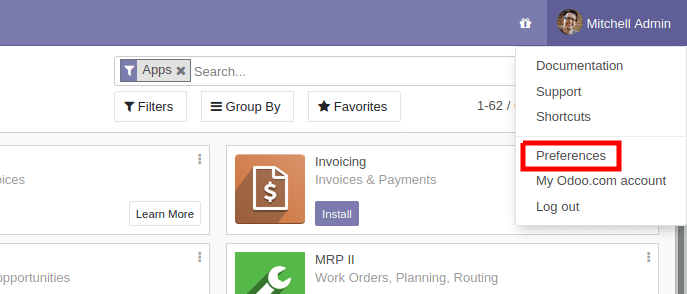
then open the Account Security tab, and click New API Key:
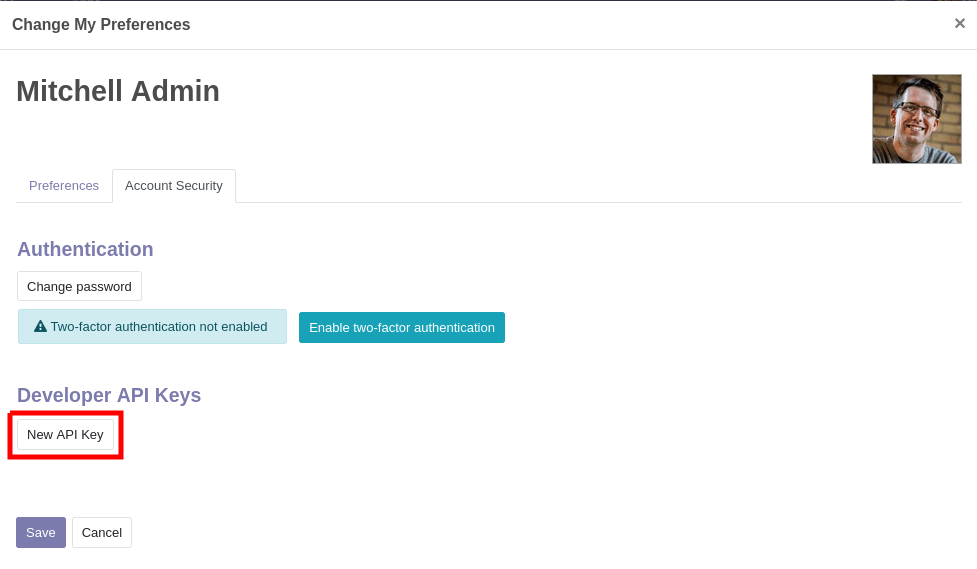
Input a description for the key, this description should be as clear and complete as possible: it is the only way you will have to identify your keys later and know whether you should remove them or keep them around.
Click Generate Key, then copy the key provided. Store this key carefully: it is equivalent to your password, and just like your password the system will not be able to retrieve or show the key again later on. If you lose this key, you will have to create a new one (and probably delete the one you lost).
Once you have keys configured on your account, they will appear above the New API Key button, and you will be able to delete them:
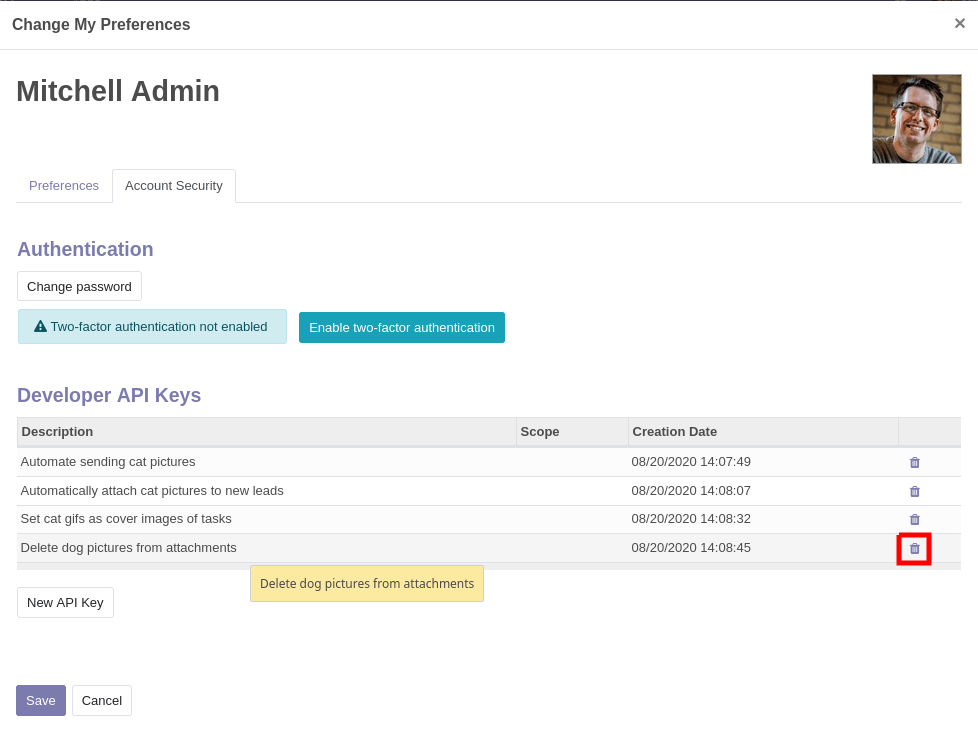
A deleted API key can not be undeleted or re-set. You will have to generate a new key and update all the places where you used the old one.
پایگاه دادهٔ تست
To make exploration simpler, you can also ask https://demo.odoo.com for a test database:
import xmlrpc.client
info = xmlrpc.client.ServerProxy('https://demo.odoo.com/start').start()
url, db, username, password = info['host'], info['database'], info['user'], info['password']
require "xmlrpc/client"
info = XMLRPC::Client.new2('https://demo.odoo.com/start').call('start')
url, db, username, password = info['host'], info['database'], info['user'], info['password']
require_once('ripcord.php');
$info = ripcord::client('https://demo.odoo.com/start')->start();
list($url, $db, $username, $password) = array($info['host'], $info['database'], $info['user'], $info['password']);
توجه
These examples use the Ripcord library, which provides a simple XML-RPC API. Ripcord requires that XML-RPC support be enabled in your PHP installation.
Since calls are performed over HTTPS, it also requires that the OpenSSL extension be enabled.
final XmlRpcClient client = new XmlRpcClient();

final XmlRpcClientConfigImpl start_config = new XmlRpcClientConfigImpl();
start_config.setServerURL(new URL("https://demo.odoo.com/start"));
final Map<String, String> info = (Map<String, String>)client.execute(
    start_config, "start", emptyList());

final String url = info.get("host"),
              db = info.get("database"),
        username = info.get("user"),
        password = info.get("password");
توجه
These examples use the Apache XML-RPC library.
The examples do not include imports as these imports couldn't be pasted in the code.
client, err := xmlrpc.NewClient("https://demo.odoo.com/start", nil)
if err != nil {
    log.Fatal(err)
}
info := map[string]string{}
client.Call("start", nil, &info)
url = info["host"].(string)
db = info["database"].(string)
username = info["user"].(string)
password = info["password"].(string)
توجه
These examples use the github.com/kolo/xmlrpc library.
The examples do not include imports as these imports couldn't be pasted in the code.
ورود به سیستم
Odoo requires users of the API to be authenticated before they can query most data.
The xmlrpc/2/common endpoint provides meta-calls which don't require
authentication, such as the authentication itself or fetching version
information. To verify if the connection information is correct before trying
to authenticate, the simplest call is to ask for the server's version. The
authentication itself is done through the authenticate function and
returns a user identifier (uid) used in authenticated calls instead of
the login.
common = xmlrpc.client.ServerProxy('{}/xmlrpc/2/common'.format(url))
common.version()
common = XMLRPC::Client.new2("#{url}/xmlrpc/2/common")
common.call('version')
$common = ripcord::client("$url/xmlrpc/2/common");
$common->version();
final XmlRpcClientConfigImpl common_config = new XmlRpcClientConfigImpl();
common_config.setServerURL(new URL(String.format("%s/xmlrpc/2/common", url)));
client.execute(common_config, "version", emptyList());
client, err := xmlrpc.NewClient(fmt.Sprintf("%s/xmlrpc/2/common", url), nil)
if err != nil {
    log.Fatal(err)
}
common := map[string]any{}
if err := client.Call("version", nil, &common); err != nil {
    log.Fatal(err)
}
Result:
{
    "server_version": "13.0",
    "server_version_info": [13, 0, 0, "final", 0],
    "server_serie": "13.0",
    "protocol_version": 1,
}
uid = common.authenticate(db, username, password, {})
uid = common.call('authenticate', db, username, password, {})
$uid = $common->authenticate($db, $username, $password, array());
int uid = (int)client.execute(common_config, "authenticate", asList(db, username, password, emptyMap()));
var uid int64
if err := client.Call("authenticate", []any{
    db, username, password,
    map[string]any{},
}, &uid); err != nil {
    log.Fatal(err)
}
فراخوانی متدها
The second endpoint is xmlrpc/2/object. It is used to call methods of odoo
models via the execute_kw RPC function.
Each call to execute_kw takes the following parameters:
پایگاهدادهٔ مورد استفاده، یک رشته
شناسهٔ کاربر (که از طریق
authenticateدریافت میشود)، یک عدد صحیحرمز عبور کاربر، یک رشته
نام مدل، یک رشته
نام متد، یک رشته
یک آرایه/فهرست از پارامترهایی که بر اساس موقعیت ارسال میشوند
یک نگاشت/دیکشنری از پارامترها برای ارسال بر اساس کلیدواژه (اختیاری)
Example
For instance, to search for records in the res.partner model, we can call
name_search with name passed by position and limit passed by
keyword (in order to get maximum 10 results):
models = xmlrpc.client.ServerProxy('{}/xmlrpc/2/object'.format(url))
models.execute_kw(db, uid, password, 'res.partner', 'name_search', ['foo'], {'limit': 10})
models = XMLRPC::Client.new2("#{url}/xmlrpc/2/object").proxy
models.execute_kw(db, uid, password, 'res.partner', 'name_search', ['foo'], {limit: 10})
$models = ripcord::client("$url/xmlrpc/2/object");
$models->execute_kw($db, $uid, $password, 'res.partner', 'name_search', array('foo'), array('limit' => 10));
final XmlRpcClient models = new XmlRpcClient() {{
    setConfig(new XmlRpcClientConfigImpl() {{
        setServerURL(new URL(String.format("%s/xmlrpc/2/object", url)));
    }});
}};
models.execute("execute_kw", asList(
    db, uid, password,
    "res.partner", "name_search",
    asList("foo"),
    new HashMap() {{ put("limit", 10); }}
));
models, err := xmlrpc.NewClient(fmt.Sprintf("%s/xmlrpc/2/object", url), nil)
if err != nil {
    log.Fatal(err)
}
var result bool
if err := models.Call("execute_kw", []any{
    db, uid, password,
    "res.partner", "name_search",
    []string{"foo"},
    map[string]bool{"limit": 10},
}, &result); err != nil {
    log.Fatal(err)
}
Result:
true
فهرست کردن رکوردها
Records can be listed and filtered via search().
search() takes a mandatory
domain filter (possibly empty), and returns the
database identifiers of all records matching the filter.
Example
برای فهرست کردن شرکتهای مشتری، بهعنوان مثال:
models.execute_kw(db, uid, password, 'res.partner', 'search', [[['is_company', '=', True]]])
models.execute_kw(db, uid, password, 'res.partner', 'search', [[['is_company', '=', true]]])
$models->execute_kw($db, $uid, $password, 'res.partner', 'search', array(array(array('is_company', '=', true))));
asList((Object[])models.execute("execute_kw", asList(
    db, uid, password,
    "res.partner", "search",
    asList(asList(
        asList("is_company", "=", true)))
)));
var records []int64
if err := models.Call("execute_kw", []any{
    db, uid, password,
    "res.partner", "search",
    []any{[]any{
        []any{"is_company", "=", true},
    }},
}, &records); err != nil {
    log.Fatal(err)
}
Result:
[7, 18, 12, 14, 17, 19, 8, 31, 26, 16, 13, 20, 30, 22, 29, 15, 23, 28, 74]
صفحهبندی
By default a search will return the ids of all records matching the
condition, which may be a huge number. offset and limit parameters are
available to only retrieve a subset of all matched records.
Example
models.execute_kw(db, uid, password, 'res.partner', 'search', [[['is_company', '=', True]]], {'offset': 10, 'limit': 5})
models.execute_kw(db, uid, password, 'res.partner', 'search', [[['is_company', '=', true]]], {offset: 10, limit: 5})
$models->execute_kw($db, $uid, $password, 'res.partner', 'search', array(array(array('is_company', '=', true))), array('offset'=>10, 'limit'=>5));
asList((Object[])models.execute("execute_kw", asList(
    db, uid, password,
    "res.partner", "search",
    asList(asList(
        asList("is_company", "=", true))),
    new HashMap() {{ put("offset", 10); put("limit", 5); }}
)));
var records []int64
if err := models.Call("execute_kw", []any{
    db, uid, password,
    "res.partner", "search",
    []any{[]any{
        []any{"is_company", "=", true},
    }},
    map[string]int64{"offset": 10, "limit":  5},
}, &records); err != nil {
    log.Fatal(err)
}
Result:
[13, 20, 30, 22, 29]
شمارش رکوردها
Rather than retrieve a possibly gigantic list of records and count them,
search_count() can be used to retrieve
only the number of records matching the query. It takes the same
domain filter as
search() and no other parameter.
Example
models.execute_kw(db, uid, password, 'res.partner', 'search_count', [[['is_company', '=', True]]])
models.execute_kw(db, uid, password, 'res.partner', 'search_count', [[['is_company', '=', true]]])
$models->execute_kw($db, $uid, $password, 'res.partner', 'search_count', array(array(array('is_company', '=', true))));
(Integer)models.execute("execute_kw", asList(
    db, uid, password,
    "res.partner", "search_count",
    asList(asList(
        asList("is_company", "=", true)))
));
var counter int64
if err := models.Call("execute_kw", []any{
    db, uid, password,
    "res.partner", "search_count",
    []any{[]any{
        []any{"is_company", "=", true},
    }},
}, &counter); err != nil {
    log.Fatal(err)
}
Result:
19
توجه
Calling search then search_count (or the other way around) may not
yield coherent results if other users are using the server: stored data
could have changed between the calls.
خواندن رکوردها
Record data are accessible via the read() method,
which takes a list of ids (as returned by
search()), and optionally a list of fields to
fetch. By default, it fetches all the fields the current user can read,
which tends to be a huge amount.
Example
ids = models.execute_kw(db, uid, password, 'res.partner', 'search', [[['is_company', '=', True]]], {'limit': 1})
[record] = models.execute_kw(db, uid, password, 'res.partner', 'read', [ids])
# count the number of fields fetched by default
len(record)
ids = models.execute_kw(db, uid, password, 'res.partner', 'search', [[['is_company', '=', true]]], {limit: 1})
record = models.execute_kw(db, uid, password, 'res.partner', 'read', [ids]).first
# count the number of fields fetched by default
record.length
$ids = $models->execute_kw($db, $uid, $password, 'res.partner', 'search', array(array(array('is_company', '=', true))), array('limit'=>1));
$records = $models->execute_kw($db, $uid, $password, 'res.partner', 'read', array($ids));
// count the number of fields fetched by default
count($records[0]);
final List ids = asList((Object[])models.execute(
    "execute_kw", asList(
        db, uid, password,
        "res.partner", "search",
        asList(asList(
            asList("is_company", "=", true))),
        new HashMap() {{ put("limit", 1); }})));
final Map partner = (Map)((Object[])models.execute(
    "execute_kw", asList(
        db, uid, password,
        "res.partner", "read",
        asList(ids)
    )
))[0];
// count the number of fields fetched by default
partner.size();
var ids []int64
if err := models.Call("execute_kw", []any{
    db, uid, password,
    "res.partner", "search",
    []any{[]any{
        []any{"is_company", "=", true},
    }},
    map[string]int64{"limit": 1},
}, &ids); err != nil {
    log.Fatal(err)
}
var records []any
if err := models.Call("execute_kw", []any{
    db, uid, password,
    "res.partner", "read",
    ids,
}, &records); err != nil {
    log.Fatal(err)
}
// count the number of fields fetched by default
count := len(records)
Result:
121
برعکس، انتخاب تنها سه فیلد که جالب در نظر گرفته میشوند.
models.execute_kw(db, uid, password, 'res.partner', 'read', [ids], {'fields': ['name', 'country_id', 'comment']})
models.execute_kw(db, uid, password, 'res.partner', 'read', [ids], {fields: %w(name country_id comment)})
$models->execute_kw($db, $uid, $password, 'res.partner', 'read', array($ids), array('fields'=>array('name', 'country_id', 'comment')));
asList((Object[])models.execute("execute_kw", asList(
    db, uid, password,
    "res.partner", "read",
    asList(ids),
    new HashMap() {{
        put("fields", asList("name", "country_id", "comment"));
    }}
)));
var recordFields []map[string]any
if err := models.Call("execute_kw", []any{
    db, uid, password,
    "res.partner", "read",
    ids,
    map[string][]string{
        "fields": {"name", "country_id", "comment"},
    },
}, &recordFields); err != nil {
    log.Fatal(err)
}
Result:
[{"comment": false, "country_id": [21, "Belgium"], "id": 7, "name": "Agrolait"}]
توجه
حتی اگر فیلد id درخواست نشده باشد، همیشه بازگردانده میشود.
فهرست فیلدهای رکورد
fields_get() can be used to inspect
a model's fields and check which ones seem to be of interest.
Because it returns a large amount of meta-information (it is also used by client
programs) it should be filtered before printing, the most interesting items
for a human user are string (the field's label), help (a help text if
available) and type (to know which values to expect, or to send when
updating a record).
Example
models.execute_kw(db, uid, password, 'res.partner', 'fields_get', [], {'attributes': ['string', 'help', 'type']})
models.execute_kw(db, uid, password, 'res.partner', 'fields_get', [], {attributes: %w(string help type)})
$models->execute_kw($db, $uid, $password, 'res.partner', 'fields_get', array(), array('attributes' => array('string', 'help', 'type')));
(Map<String, Map<String, Object>>)models.execute("execute_kw", asList(
    db, uid, password,
    "res.partner", "fields_get",
    emptyList(),
    new HashMap() {{
        put("attributes", asList("string", "help", "type"));
    }}
));
recordFields := map[string]string{}
if err := models.Call("execute_kw", []any{
    db, uid, password,
    "res.partner", "fields_get",
    []any{},
    map[string][]string{
        "attributes": {"string", "help", "type"},
    },
}, &recordFields); err != nil {
    log.Fatal(err)
}
Result:
{
    "ean13": {
        "type": "char",
        "help": "BarCode",
        "string": "EAN13"
    },
    "property_account_position_id": {
        "type": "many2one",
        "help": "The fiscal position will determine taxes and accounts used for the partner.",
        "string": "Fiscal Position"
    },
    "signup_valid": {
        "type": "boolean",
        "help": "",
        "string": "Signup Token is Valid"
    },
    "date_localization": {
        "type": "date",
        "help": "",
        "string": "Geo Localization Date"
    },
    "ref_company_ids": {
        "type": "one2many",
        "help": "",
        "string": "Companies that refers to partner"
    },
    "sale_order_count": {
        "type": "integer",
        "help": "",
        "string": "# of Sales Order"
    },
    "purchase_order_count": {
        "type": "integer",
        "help": "",
        "string": "# of Purchase Order"
    },
جستجو و خواندن
Because it is a very common task, Odoo provides a
search_read() shortcut which, as its name suggests, is
equivalent to a search() followed by a
read(), but avoids having to perform two requests
and keep ids around.
Its arguments are similar to search()'s, but it
can also take a list of fields (like read(),
if that list is not provided it will fetch all fields of matched records).
Example
models.execute_kw(db, uid, password, 'res.partner', 'search_read', [[['is_company', '=', True]]], {'fields': ['name', 'country_id', 'comment'], 'limit': 5})
models.execute_kw(db, uid, password, 'res.partner', 'search_read', [[['is_company', '=', true]]], {fields: %w(name country_id comment), limit: 5})
$models->execute_kw($db, $uid, $password, 'res.partner', 'search_read', array(array(array('is_company', '=', true))), array('fields'=>array('name', 'country_id', 'comment'), 'limit'=>5));
asList((Object[])models.execute("execute_kw", asList(
    db, uid, password,
    "res.partner", "search_read",
    asList(asList(
        asList("is_company", "=", true))),
    new HashMap() {{
        put("fields", asList("name", "country_id", "comment"));
        put("limit", 5);
    }}
)));
var recordFields []map[string]any
if err := models.Call("execute_kw", []any{
    db, uid, password,
    "res.partner", "search_read",
    []any{[]any{
        []any{"is_company", "=", true},
    }},
    map[string]any{
        "fields": []string{"name", "country_id", "comment"},
        "limit":  5,
    },
}, &recordFields); err != nil {
    log.Fatal(err)
}
Result:
[
    {
        "comment": false,
        "country_id": [ 21, "Belgium" ],
        "id": 7,
        "name": "Agrolait"
    },
    {
        "comment": false,
        "country_id": [ 76, "France" ],
        "id": 18,
        "name": "Axelor"
    },
    {
        "comment": false,
        "country_id": [ 233, "United Kingdom" ],
        "id": 12,
        "name": "Bank Wealthy and sons"
    },
    {
        "comment": false,
        "country_id": [ 105, "India" ],
        "id": 14,
        "name": "Best Designers"
    },
    {
        "comment": false,
        "country_id": [ 76, "France" ],
        "id": 17,
        "name": "Camptocamp"
    }
]
ایجاد رکوردها
Records of a model are created using create(). The
method creates a single record and returns its database identifier.
create() takes a mapping of fields to values, used
to initialize the record. For any field which has a default value and is not
set through the mapping argument, the default value will be used.
Example
id = models.execute_kw(db, uid, password, 'res.partner', 'create', [{'name': "New Partner"}])
id = models.execute_kw(db, uid, password, 'res.partner', 'create', [{name: "New Partner"}])
$id = $models->execute_kw($db, $uid, $password, 'res.partner', 'create', array(array('name'=>"New Partner")));
final Integer id = (Integer)models.execute("execute_kw", asList(
    db, uid, password,
    "res.partner", "create",
    asList(new HashMap() {{ put("name", "New Partner"); }})
));
var id int64
if err := models.Call("execute_kw", []any{
    db, uid, password,
    "res.partner", "create",
    []map[string]string{
        {"name": "New Partner"},
    },
}, &id); err != nil {
    log.Fatal(err)
}
Result:
78
هشدار
While most value types are what would expect (integer for
Integer, string for Char
or Text),
Date,DatetimeandBinaryfields use string valuesOne2manyandMany2manyuse a special command protocol detailed inthe documentation to the write method.
بهروزرسانی رکوردها
Records can be updated using write(). It takes
a list of records to update and a mapping of updated fields to values similar
to create().
Multiple records can be updated simultaneously, but they will all get the same values for the fields being set. It is not possible to perform "computed" updates (where the value being set depends on an existing value of a record).
Example
models.execute_kw(db, uid, password, 'res.partner', 'write', [[id], {'name': "Newer partner"}])
# get record name after having changed it
models.execute_kw(db, uid, password, 'res.partner', 'read', [[id], ['display_name']])
models.execute_kw(db, uid, password, 'res.partner', 'write', [[id], {name: "Newer partner"}])
# get record name after having changed it
models.execute_kw(db, uid, password, 'res.partner', 'read', [[id], ['display_name']])
$models->execute_kw($db, $uid, $password, 'res.partner', 'write', array(array($id), array('name'=>"Newer partner")));
// get record name after having changed it
$models->execute_kw($db, $uid, $password,
    'res.partner', 'read', array(array($id), array('display_name')));
models.execute("execute_kw", asList(
    db, uid, password,
    "res.partner", "write",
    asList(
        asList(id),
        new HashMap() {{ put("name", "Newer Partner"); }}
    )
));
// get record name after having changed it
asList((Object[])models.execute("execute_kw", asList(
    db, uid, password,
    "res.partner", "read",
    asList(asList(id), asList("display_name"))
)));
var result bool
if err := models.Call("execute_kw", []any{
    db, uid, password,
    "res.partner", "write",
    []any{
        []int64{id},
        map[string]string{"name": "Newer partner"},
    },
}, &result); err != nil {
    log.Fatal(err)
}
// get record name after having changed it
var record []any
if err := models.Call("execute_kw", []any{
    db, uid, password,
    "res.partner", "name_get",
    []any{
        []int64{id},
    },
}, &record); err != nil {
    log.Fatal(err)
}
Result:
[[78, "Newer partner"]]
حذف رکوردها
Records can be deleted in bulk by providing their ids to
unlink().
Example
models.execute_kw(db, uid, password, 'res.partner', 'unlink', [[id]])
# check if the deleted record is still in the database
models.execute_kw(db, uid, password, 'res.partner', 'search', [[['id', '=', id]]])
models.execute_kw(db, uid, password, 'res.partner', 'unlink', [[id]])
# check if the deleted record is still in the database
models.execute_kw(db, uid, password, 'res.partner', 'search', [[['id', '=', id]]])
$models->execute_kw($db, $uid, $password, 'res.partner', 'unlink', array(array($id)));
// check if the deleted record is still in the database
$models->execute_kw(
    $db, $uid, $password, 'res.partner', 'search', array(array(array('id', '=', $id)))
);
models.execute("execute_kw", asList(
    db, uid, password,
    "res.partner", "unlink",
    asList(asList(id))));
// check if the deleted record is still in the database
asList((Object[])models.execute("execute_kw", asList(
    db, uid, password,
    "res.partner", "search",
    asList(asList(asList("id", "=", 78)))
)));
var result bool
if err := models.Call("execute_kw", []any{
    db, uid, password,
    "res.partner", "unlink",
    []any{
        []int64{id},
    },
}, &result); err != nil {
    log.Fatal(err)
}
// check if the deleted record is still in the database
var record []any
if err := models.Call("execute_kw", []any{
    db, uid, password,
    "res.partner", "search",
    []any{[]any{
        []any{"id", "=", id},
    }},
}, &record); err != nil {
    log.Fatal(err)
}
Result:
[]
بازرسی و دروننگری
While we previously used fields_get() to query a
model and have been using an arbitrary model from the start, Odoo stores
most model metadata inside a few meta-models which allow both querying the
system and altering models and fields (with some limitations) on the fly over
XML-RPC.
ir.model
از طریق فیلدهای مختلف خود اطلاعاتی دربارهٔ مدلهای Odoo فراهم میکند.
nameتوصیفی قابلخواندن از مدل برای انسان
modelنام هر مدل در سیستم
statewhether the model was generated in Python code (
base) or by creating anir.modelrecord (manual)field_idlist of the model's fields through a
One2manyto ir.model.fieldsview_idsOne2manyto the View architectures defined for the modelaccess_idsOne2manyrelation to the Access Rights set on the model
از ir.model میتوان برای موارد زیر استفاده کرد
Query the system for installed models (as a precondition to operations on the model or to explore the system's content).
Get information about a specific model (generally by listing the fields associated with it).
ایجاد مدلهای جدید بهصورت پویا از طریق RPC.
مهم
نامهای مدل سفارشی باید با
x_شروع شوند.The
statemust be provided and set tomanual, otherwise the model will not be loaded.افزودن متدهای جدید به یک مدل سفارشی ممکن نیست، فقط فیلدها.
Example
A custom model will initially contain only the "built-in" fields available on all models:
models.execute_kw(db, uid, password, 'ir.model', 'create', [{
    'name': "Custom Model",
    'model': "x_custom_model",
    'state': 'manual',
}])
models.execute_kw(db, uid, password, 'x_custom_model', 'fields_get', [], {'attributes': ['string', 'help', 'type']})
$models->execute_kw($db, $uid, $password, 'ir.model', 'create', array(array(
    'name' => "Custom Model",
    'model' => 'x_custom_model',
    'state' => 'manual'
)));
$models->execute_kw($db, $uid, $password, 'x_custom_model', 'fields_get', array(), array('attributes' => array('string', 'help', 'type')));
models.execute_kw(db, uid, password, 'ir.model', 'create', [{
    name: "Custom Model",
    model: 'x_custom_model',
    state: 'manual'
}])
fields = models.execute_kw(db, uid, password, 'x_custom_model', 'fields_get', [], {attributes: %w(string help type)})
models.execute(
    "execute_kw", asList(
        db, uid, password,
        "ir.model", "create",
        asList(new HashMap<String, Object>() {{
            put("name", "Custom Model");
            put("model", "x_custom_model");
            put("state", "manual");
        }})
));
final Object fields = models.execute(
    "execute_kw", asList(
        db, uid, password,
        "x_custom_model", "fields_get",
        emptyList(),
        new HashMap<String, Object> () {{
            put("attributes", asList(
                    "string",
                    "help",
                    "type"));
        }}
));
var id int64
if err := models.Call("execute_kw", []any{
    db, uid, password,
    "ir.model", "create",
    []map[string]string{
        {
            "name":  "Custom Model",
            "model": "x_custom_model",
            "state": "manual",
        },
    },
}, &id); err != nil {
    log.Fatal(err)
}
recordFields := map[string]string{}
if err := models.Call("execute_kw", []any{
    db, uid, password,
    "x_custom_model", "fields_get",
    []any{},
    map[string][]string{
        "attributes": {"string", "help", "type"},
    },
}, &recordFields); err != nil {
    log.Fatal(err)
}
Result:
{
    "create_uid": {
        "type": "many2one",
        "string": "Created by"
    },
    "create_date": {
        "type": "datetime",
        "string": "Created on"
    },
    "__last_update": {
        "type": "datetime",
        "string": "Last Modified on"
    },
    "write_uid": {
        "type": "many2one",
        "string": "Last Updated by"
    },
    "write_date": {
        "type": "datetime",
        "string": "Last Updated on"
    },
    "display_name": {
        "type": "char",
        "string": "Display Name"
    },
    "id": {
        "type": "integer",
        "string": "Id"
    }
}
ir.model.fields
Provides information about the fields of Odoo models and allows adding custom fields without using Python code.
model_idMany2oneto ir.model to which the field belongsnamethe field's technical name (used in
readorwrite)field_descriptionthe field's user-readable label (e.g.
stringinfields_get)ttypethe type of field to create
statewhether the field was created via Python code (
base) or viair.model.fields(manual)required،readonly،translateپرچم متناظر را روی فیلد فعال میکند
groupsfield-level access control, a
Many2manytores.groupsselection,size,on_delete,relation,relation_field,domaintype-specific properties and customizations, see the fields documentation for details
مهم
Like custom models, only new fields created with
state="manual"are activated as actual fields on the model.Computed fields can not be added via
ir.model.fields, some field meta-information (defaults, onchange) can not be set either.
Example
id = models.execute_kw(db, uid, password, 'ir.model', 'create', [{
    'name': "Custom Model",
    'model': "x_custom",
    'state': 'manual',
}])
models.execute_kw(db, uid, password, 'ir.model.fields', 'create', [{
    'model_id': id,
    'name': 'x_name',
    'ttype': 'char',
    'state': 'manual',
    'required': True,
}])
record_id = models.execute_kw(db, uid, password, 'x_custom', 'create', [{'x_name': "test record"}])
models.execute_kw(db, uid, password, 'x_custom', 'read', [[record_id]])
$id = $models->execute_kw($db, $uid, $password, 'ir.model', 'create', array(array(
    'name' => "Custom Model",
    'model' => 'x_custom',
    'state' => 'manual'
)));
$models->execute_kw($db, $uid, $password, 'ir.model.fields', 'create', array(array(
    'model_id' => $id,
    'name' => 'x_name',
    'ttype' => 'char',
    'state' => 'manual',
    'required' => true
)));
$record_id = $models->execute_kw($db, $uid, $password, 'x_custom', 'create', array(array('x_name' => "test record")));
$models->execute_kw($db, $uid, $password, 'x_custom', 'read', array(array($record_id)));
id = models.execute_kw(db, uid, password, 'ir.model', 'create', [{
    name: "Custom Model",
    model: "x_custom",
    state: 'manual'
}])
models.execute_kw(db, uid, password, 'ir.model.fields', 'create', [{
    model_id: id,
    name: "x_name",
    ttype: "char",
    state: "manual",
    required: true
}])
record_id = models.execute_kw(db, uid, password, 'x_custom', 'create', [{x_name: "test record"}])
models.execute_kw(db, uid, password, 'x_custom', 'read', [[record_id]])
final Integer id = (Integer)models.execute(
    "execute_kw", asList(
        db, uid, password,
        "ir.model", "create",
        asList(new HashMap<String, Object>() {{
            put("name", "Custom Model");
            put("model", "x_custom");
            put("state", "manual");
        }})
));
models.execute(
    "execute_kw", asList(
        db, uid, password,
        "ir.model.fields", "create",
        asList(new HashMap<String, Object>() {{
            put("model_id", id);
            put("name", "x_name");
            put("ttype", "char");
            put("state", "manual");
            put("required", true);
        }})
));
final Integer record_id = (Integer)models.execute(
    "execute_kw", asList(
        db, uid, password,
        "x_custom", "create",
        asList(new HashMap<String, Object>() {{
            put("x_name", "test record");
        }})
));

client.execute(
    "execute_kw", asList(
        db, uid, password,
        "x_custom", "read",
        asList(asList(record_id))
));
var id int64
if err := models.Call("execute_kw", []any{
    db, uid, password,
    "ir.model", "create",
    []map[string]string{
        {
            "name":  "Custom Model",
            "model": "x_custom",
            "state": "manual",
        },
    },
}, &id); err != nil {
    log.Fatal(err)
}
var fieldId int64
if err := models.Call("execute_kw", []any{
    db, uid, password,
    "ir.model.fields", "create",
    []map[string]any{
        {
            "model_id": id,
            "name":     "x_name",
            "ttype":    "char",
            "state":    "manual",
            "required": true,
        },
    },
}, &fieldId); err != nil {
    log.Fatal(err)
}
var recordId int64
if err := models.Call("execute_kw", []any{
    db, uid, password,
    "x_custom", "create",
    []map[string]string{
        {"x_name": "test record"},
    },
}, &recordId); err != nil {
    log.Fatal(err)
}
var recordFields []map[string]any
if err := models.Call("execute_kw", []any{
    db, uid, password,
    "x_custom", "read",
    [][]int64{{recordId}},
}, recordFields); err != nil {
    log.Fatal(err)
}
Result:
[
    {
        "create_uid": [1, "Administrator"],
        "x_name": "test record",
        "__last_update": "2014-11-12 16:32:13",
        "write_uid": [1, "Administrator"],
        "write_date": "2014-11-12 16:32:13",
        "create_date": "2014-11-12 16:32:13",
        "id": 1,
        "display_name": "test record"
    }
]