
نیوزیلند
ماژولها
ماژولهای زیر مرتبط با بومیسازی نیوزیلند در دسترس هستند:
نام |
نام فنی |
توضیحات |
|---|---|---|
New Zealand - Accounting |
|
هنگامی که بستهٔ بومیسازی مالی حسابداری روی نیوزیلند تنظیم شده باشد، بهصورت پیشفرض نصب میشود. این ماژول همچنین ماژول گزارش اعلامیهٔ واریز را نصب میکند. |
Employment Hero NZ Payroll |
|
این ماژول همهٔ اجراهای پرداخت حقوق از Employment Hero را با اسناد حسابداری Odoo همگامسازی میکند. |
EFT Batch Payment |
|
این ماژول به کسبوکارها اجازه میدهد پرداختهای انبوه مانند حقوق و دستمزد و پرداختهای فروشنده را سادهسازی کنند. هر بانک قالب مخصوص خود را برای این تراکنشها دارد. |
توجه
ماژولهای اصلی بومیسازی بهصورت خودکار همراه با بومیسازی نصب میشوند. بقیه را میتوان بهصورت دستی نصب کرد.
بررسی اجمالی بومیسازی
دفتر حسابها: ساختاری از پیش تعریفشده که متناسب با استانداردهای حسابداری نیوزیلند است
Fiscal positions (نگاشت مالیات و حساب): تنظیمات مالیاتی خودکار بر اساس وضعیت ثبتنام مشتری یا تأمینکننده
مالیاتها و GST
مالیاتهای پیشفرض روی گزارش GST تأثیر میگذارند که میتوان از طریق به آن دسترسی پیدا کرد
نرخ استاندارد مالیات بر کالا و خدمات (GST) برابر با ۱۵٪ است، اما نرخها و معافیتهای متفاوتی برای دستههای خاصی از کالاها و خدمات وجود دارد.
همچنین ببینید
نگاشت مالیات
در بستهٔ بومیسازی نیوزیلند، نام مالیاتها نرخ مالیات را بهعنوان بخشی جداییناپذیر از قرارداد نامگذاری خود در بر میگیرند.
همچنین ببینید
اینها مالیاتهای موجود در Odoo هستند.
نام GST |
توضیحات |
label در فاکتورها |
نوع GST |
|---|---|---|---|
۱۵٪ |
فروش (۱۵٪) |
فروش GST (۱۵٪) |
فروش |
۱۵٪ |
خرید (۱۵٪) |
خریدهای GST (۱۵٪) |
خریدها |
0% EX |
فروش صفر/صادرات (۰٪) |
فروشهای با نرخ صفر (صادرات) |
فروش |
0% F |
خرید صفر/واردات (۰٪) |
خریدهای GST Free |
خریدها |
0% TPS |
خرید (واردات مشمول مالیات) |
Purchase (Taxable Imports) - مالیات جداگانه پرداختشده |
خریدها |
100% ONLY |
فقط GST - واردات |
GST فقط روی واردات |
خریدها |
گزارشگیری
گزارش GST
گزارش مالیات بر کالا و خدمات (GST) یک الزام حیاتی گزارشدهی مالیاتی برای کسبوکارهای ثبتشده برای GST است. اظهارنامهٔ GST برای گزارش و پرداخت GST به ادارهٔ درآمد داخلی (IRD) استفاده میشود.
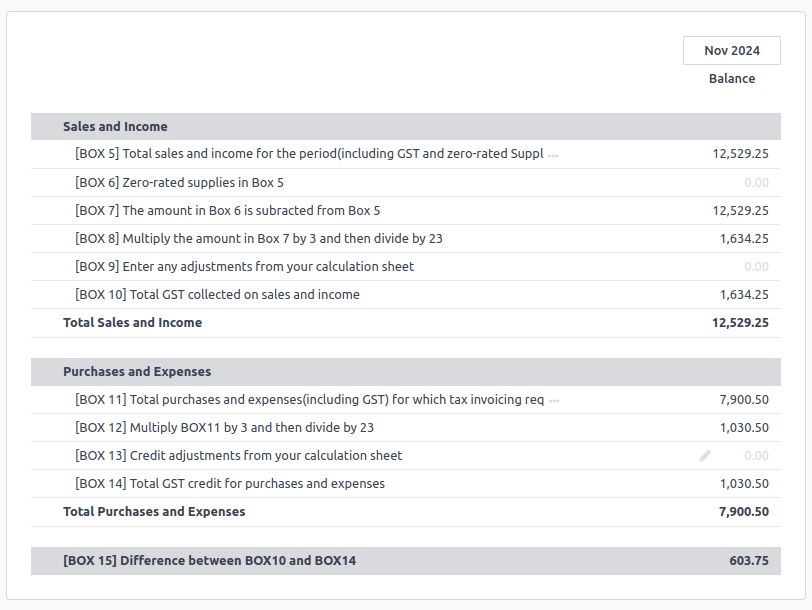
مبالغ پایه و مالیات از GST جمعآوری میشوند که در Odoo از پیش پیکربندی شده تا با الزامات اظهارنامهٔ GST (کادرهای ۱ تا ۱۵) همسو باشد. GST را میتوان برای موارد استفادهٔ خاص نیز بهصورت دستی پیکربندی کرد، مانند رفتارهای خاص GST (برای مثال، اعمال نرخ صفر برای کالاهای کشاورزی صادراتی). پس از تکمیل تنظیمات GST برای هر حساب، Odoo بهصورت خودکار اقلام ژورنال را در کادرهای مناسب دستهبندی میکند. این کار تضمین میکند که اظهارنامهٔ GST دقیق است و بهطور کامل فعالیتهای مالی کسبوکار را منعکس میکند.
همچنین ببینید
بستن گزارش GST
پیش از ارسال اظهارنامهٔ مالیاتی (گزارش GST) به IRD، باید تناوب اظهارنامهٔ مالیاتی تنظیم شود.
همچنین ببینید
پیش از بستن سند برای اولین بار، حالت توسعهدهنده را فعال کنید و به بروید تا حساب GST پرداختنی و حساب GST دریافتنی پیشفرض را تنظیم کنید.
پس از تنظیم حسابهای GST پرداختنی و GST دریافتنی، گزارش اظهارنامهٔ مالیاتی بهصورت خودکار یک سند بستن ژورنال دقیق تولید میکند و مانده GST را با حساب تسویهٔ GST موازنه میکند.
مانده میان GST دریافتنی و پرداختنی در برابر حساب تسویهٔ مالیاتی تعریفشده در گروه مالیاتی تنظیم میشود. سپس مبلغی که باید به IRD پرداخت شود یا از آن دریافت شود میتواند با یک تراکنش بانکی تطبیق داده شود.
مهم
گزارش GST مستقیماً به IRD ارسال نمیشود. در عوض، Odoo بهصورت خودکار مقادیر موردنیاز برای هر بخش را محاسبه میکند و گزینههایی برای ممیزی و بازبینی دادهها بهمنظور درک روشنتر سابقهٔ آن فراهم میکند. سپس کسبوکارها میتوانند این مقادیر را به درگاه IRD ارسال کنند.
اعلامیه پرداخت
اعلامیه واریز سندی است که بهعنوان مدرک پرداخت به یک کسبوکار بهکار میرود. برای دسترسی به آن، به بروید و پرداخت(ها) را انتخاب کنید. سپس روی چاپ کلیک کنید و رسید پرداخت را انتخاب کنید.
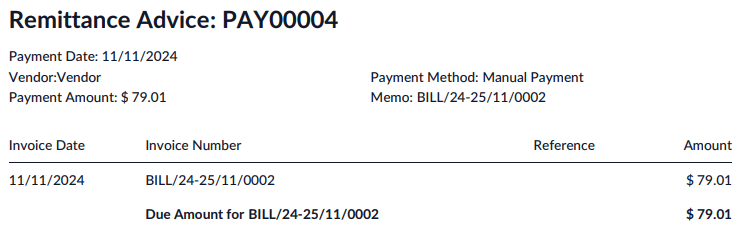
حسابداری
صدور فاکتور الکترونیکی (E-invoicing)
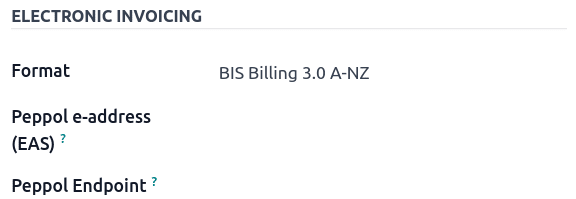
Odoo اجازه میدهد تنظیمات صدور فاکتور الکترونیکی برای هر مخاطب پیکربندی شود.
مهم
اعتبارسنجی یک فاکتور یا یادداشت بستانکار برای مخاطبی در شبکهٔ PEPPOL، یک فایل XML سازگار را دانلود میکند که میتواند بهصورت دستی در شبکهٔ PEPPOL بارگذاری شود. Odoo در حال حاضر در فرایند تبدیلشدن به یک نقطهٔ دسترسی برای منطقهٔ ANZ است.
همچنین ببینید
پرداختهای دستهای EFT
یک فایل دستهای EFT قالبی دیجیتالی است که برای تسهیل پردازش پرداختهای انبوه برای کسبوکارها استفاده میشود. این فایل به شرکتها اجازه میدهد چندین پرداخت ورودی و خروجی را در یک فایل الکترونیکی واحد تجمیع کنند. این فرایند معمولاً توسط کسبوکارهایی که چندین پرداخت را بهصورت همزمان مدیریت میکنند، مانند حقوق و دستمزد یا پرداختها به چندین تأمینکننده، استفاده میشود.
پیکربندی
ماژول EFT Batch Payment (
l10n_nz_eft) را نصب کنید.به بروید. در بخش پرداختهای مشتری، پرداخت های انبوه را فعال کنید.
همچنین ببینید
ژورنال بانکی
به بروید تا ژورنال بانکی را پیکربندی کنید. در تب داده های روزنامه، شماره حساب را وارد کنید و روی Create and edit... کلیک کنید. در پنجرهٔ Create شماره حساب، فیلد بانک را تکمیل کنید و ارسال پول را فعال کنید تا حساب بانکی بهعنوان مورد اعتماد تنظیم شود. فیلد ارز اختیاری است.
حسابهای بانکی مخاطبین
برای افزودن اطلاعات بانکی برای یک مخاطب، به ، بروید یا مستقیماً از طریق اپلیکیشن مخاطبین به مخاطب دسترسی پیدا کنید. مخاطب مربوطه را انتخاب کنید، سپس تب حسابداری را باز کنید. در بخش حسابهای بانکی، روی افزودن یک سطر کلیک کنید تا جزئیات موردنیاز را وارد کنید.
شماره حساب
بانک
دارنده حساب (بهصورت خودکار برای آن مخاطب انتخاب میشود)
ارسال پول باید فعال باشد.
تولید یک فایل EFT
به یا بروید. فاکتورها/صورتحسابهایی را که باید پرداخت شوند از فهرست انتخاب کنید و روی پرداخت کلیک کنید. در فیلد روش پرداخت، New Zealand EFT را انتخاب کنید و روی ایجاد پرداخت کلیک کنید.
توجه
تیک Group Payment اختیاری است. این گزینه تنها زمانی ظاهر میشود که چندین فاکتور یا صورتحساب از یک مخاطب یکسان وجود داشته باشد.
در پنجرهٔ پرداختها، اطلاعات EFT موردنیاز برای هر پرداخت، مانند Particulars و Analysis Code، میتوانند در صورت نیاز وارد شوند.
توجه
همان اطلاعات پرداخت را میتوان در یا یافت.
سپس، به نمای فهرست پرداختها بازگردید، پرداختهایی را که باید دستهبندی شوند انتخاب کنید و روی ایجاد دسته کلیک کنید.
در پنجرهٔ پرداخت دستهای، فیلدهای زیر را تکمیل کنید:
EFT file format
مرجع پرداخت
Payment Particulars
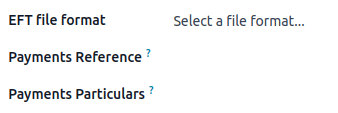
سپس، روی تایید اعتبار کلیک کنید. Odoo فایل EFT را در چتر تولید میکند. روی فایل کلیک کنید تا آن را پیشنمایش یا دانلود کنید.
مهم
هر بانک الزامات قالب مخصوص خود را برای پرداختهای دستهای EFT دارد. مطمئن شوید که قالب صحیح فایل EFT را انتخاب میکنید. برخی بانکها ممکن است تکمیل فیلدهای اضافی، مانند Direct Debit Information و Dishonour Account، را نیز الزامی کنند.
همچنین ببینید
ویژگیهای خاص صنعت
حمل و نقل Starshipit
Starshipit یک اپراتور خدمات حملونقل است که یکپارچهسازی شرکتهای پیک حملونقل استرالزی را با Odoo تسهیل میکند.
همچنین ببینید
راهحلهای «اکنون بخر، بعداً پرداخت کن»
راهکارهای هماکنون بخر، بعداً بپرداز روشهای پرداخت محبوبی برای فروشگاههای الکترونیکی هستند. برخی از این راهکارها از طریق ارائهدهندگان Stripe و پرداخت AsiaPay در دسترس هستند.
ترمینالهای صندوق فروش
برای داشتن یک اتصال مستقیم میان Odoo و یک ترمینال صندوق فروش، به یک ترمینال Stripe نیاز است. Odoo از راهکار پرداخت EFTPOS پشتیبانی میکند.
توجه
برای استفاده از Odoo بهعنوان سیستم اصلی صندوق فروش، نیازی به ترمینال پرداخت Stripe نیست. تنها اشکال استفادهنکردن از Stripe این است که صندوقداران باید مبلغ نهایی پرداخت را بهصورت دستی روی ترمینال وارد کنند.
حقوق و دستمزد
یکپارچهسازی Employment Hero
اگر کسبوکار شما هماکنون با Employment Hero راهاندازی شده و در حال فعالیت است، میتوان از این رابط بهعنوان یک راهکار جایگزین حقوق و دستمزد استفاده کرد.
ماژول Employment Hero بهصورت خودکار اسناد حسابداری فیش حقوقی (برای مثال مخارج، هزینههای اجتماعی، بدهیها، مالیاتها) را از Employment Hero به Odoo همگامسازی میکند. مدیریت حقوق و دستمزد همچنان در Employment Hero انجام میشود؛ تنها اسناد حسابداری در Odoo ثبت میشوند.
مهم
برای پیکربندی API مربوط به Employment Hero برای نیوزیلند، از مقدار زیر بهعنوان Payroll URL استفاده کنید: https://api.nzpayroll.co.nz/.