
گزارشگیری تحلیل منبع
گزارشگیری ابزاری حیاتی است که بخشهای استخدام برای کسب بینش دربارهٔ کل فرایند استخدام از آن استفاده میکنند.
تعیین این که متقاضیان از کجا میآیند میتواند اطلاعاتی دربارهٔ این که کدام منابع بهترین نتایج را دارند ارائه دهد. این اطلاعات با گزارش Source Analysis تعیین میشود. با این دادهها، تیمهای استخدام میتوانند بهتر استراتژیهای استخدامی خود را تغییر دهند تا متقاضیان بهتری را از نظر کمیت و کیفیت جذب کنند.
باز کردن گزارش
برای دسترسی به گزارش Source Analysis، به بروید.
این دادهها برای متقاضان 365 روز گذشته در یک نمای پیشفرض (Graph) ارائه میشود و تعداد متقاضیان را بر اساس مبدا نشان میدهد و بیشتر بر اساس مرحله (در جریان و استخدام شده) تفکیک میشود.
نشانگر را روی هر ستون نگه دارید تا اعداد مشخص آن ستون را مشاهده کنید.
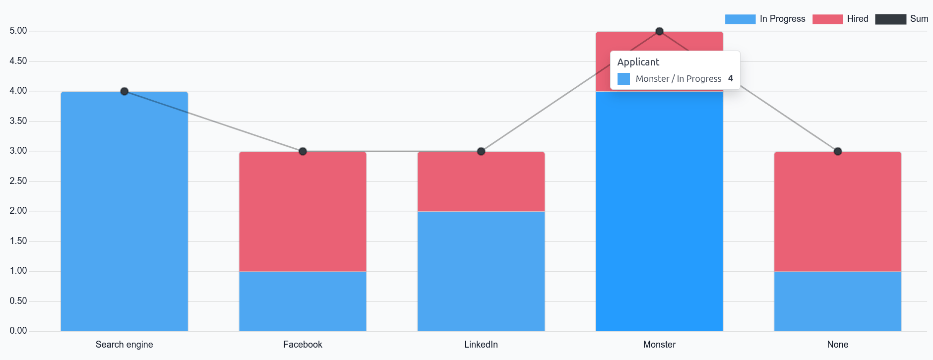
گزارش اثربخشی منبع
برای شناسایی این که کدام منابع (مانند تابلوهای کاریابی، شبکههای اجتماعی، معرفی کارمندان، وبسایت شرکت) بیشترین استخدام را تولید میکنند، نمای جدول پایوت گزارش تحلیل منبع را میتوان برای نمایش جزئیات بیشتر پیکربندی کرد.
برای مشاهدهٔ گزارش تحلیل منبع در یک جدول پایوت، روی نماد (Pivot) در گوشهٔ بالا-راست کلیک کنید. دادهها در یک جدول پایوت ارائه میشوند که سطرها با موقعیتهای شغلی و ستونها با مراحل پر میشوند.
برای گسترش این نمودار جهت نمایش منابع مشخصی که متقاضیان از آن آمدهاند، روی جعبهٔ مجموع بالای ستونها کلیک کنید تا یک منوی کشویی نمایان شود، سپس روی مبدا کلیک کنید.
سپس هر ستون بر اساس منبع گروهبندی میشود، مانند: Search engine، فیسبوک، لینکدین و غیره. هر منبع شمارش جداگانهای برای متقاضی، استخدام شده و رد شده نمایش میدهد.
این اطلاعات، بهشکلی که ارائه شده، مشاهدهٔ اعداد مشخص هر منبع را دشوار میکند. روی نماد (Flip axis) کلیک کنید تا اطلاعات جابهجا شوند. پس از آن، سطرها نشاندهندهٔ منبع و ستونها نشاندهندهٔ موقعیتهای شغلی هستند که بیشتر بر اساس مرحله تقسیم میشوند.
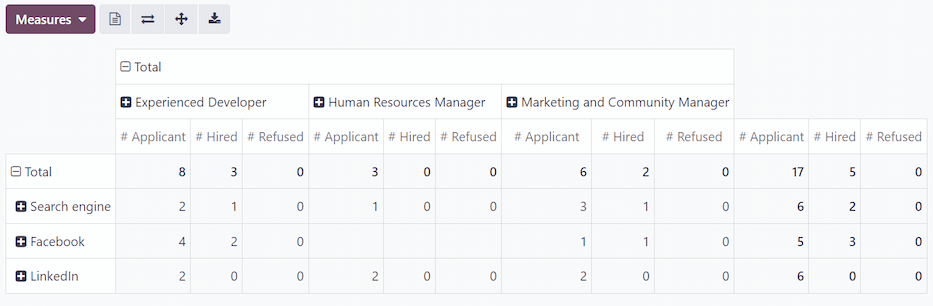
در این نما، تعداد کل متقاضیان، کارمندان استخدامشده و متقاضیان رد شده برای هر منبع و همچنین برای هر مرحله بهتفکیک موقعیت شغلی نمایش داده میشود.
کانال ارتباطی
مشاهدهٔ کانال ارتباطی متقاضیان میتواند برای دیدن اینکه کدام کانال ارتباطی مشخص موفقتر است سودمند باشد.
Mediums روشهای مشخصی هستند که متقاضی برای کشف و سپس درخواست برای موقعیتهای شغلی استفاده کرده است، مانند جستجوی ارگانیک، جستجوی پولی، تبلیغ شبکهٔ اجتماعی، ایمیل و غیره.
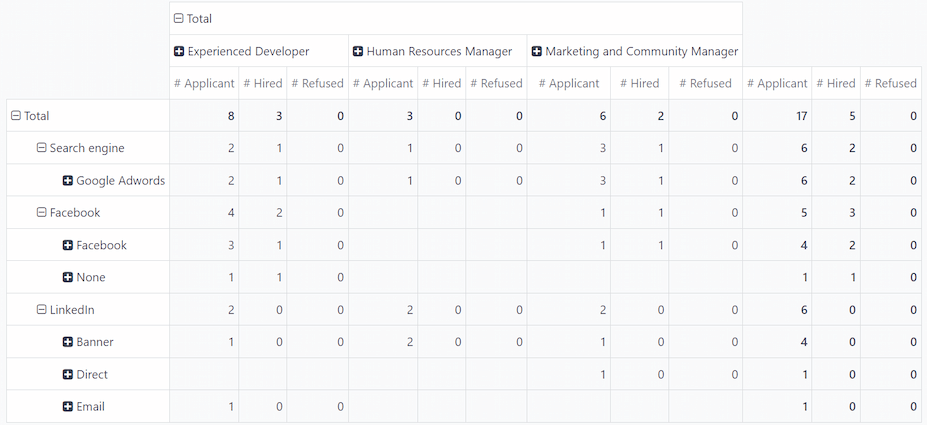
برای گروهبندی بیشتر نتایج بر اساس کانال ارتباطی، روی یکی از سطرهای [Source] کلیک کنید. در منوی کشویی حاصل روی متوسط کلیک کنید. سطر، کانالهای ارتباطی مشخص مرتبط با آن منبع خاص را ارائه میدهد.
پس از انتخاب متوسط برای یک منبع، کلیک روی سطر دیگر بهصورت خودکار سنجههای مشخص کانالهای ارتباطی آن منبع را نمایان میکند.
توجه
تنها کانالهای ارتباطی که برای یک منبع ظاهر میشوند، کانالهایی هستند که روی فرم یک متقاضی تنظیم شدهاند. اگر یک کانال ارتباطی برای هیچ متقاضیای تنظیم نشده باشد، آن کانال در سطرهای کشویی زیر منبع ظاهر نمیشود.
برای مثال، اگر هیچ متقاضیای با کانال ارتباطی Google Adwords درخواست نداده باشد، آن کانال در زیر سطر منبع Search engine ظاهر نمیشود.