
سنگاپور
افزودن کدهای QR پینائو (PayNow) به فاکتورها
پینائو (PayNow) یک بستر خدمات پرداخت است که به مشتریان امکان میدهد از طریق بانکداری آنلاین و موبایلی، پرداختهای داخلی فوری به افراد و بازرگانان را به دلار سنگاپور انجام دهند.
فعالسازی QR codes
به بروید. در بخش پرداختهای مشتری، ویژگی کدهای QR را فعال کنید.
پیکربندی حساب بانکی پینائو (PayNow)
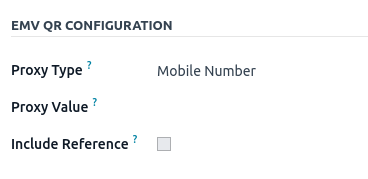
به بروید و حساب بانکی موردنظر برای فعالسازی PayNow را انتخاب کنید. بسته به نوع انتخابشده، نوع پراکسی را تنظیم کرده و فیلد مقدار پراکسی را تکمیل کنید.
مهم
کشور دارندهٔ حساب باید در فرم مخاطب آن روی
Singaporeتنظیم شود.شهر صاحب حساب الزامی است.
همچنین میتوانید با تیک زدن چکباکس شامل مرجع شماره فاکتور را در QR code بگنجانید.
همچنین ببینید
پیکربندی ژورنال بانکی
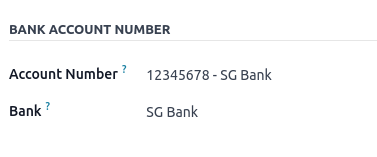
به بروید، ژورنال بانکی را باز کنید، سپس شماره حساب و بانک را در تب داده های روزنامه پر کنید.
صدور فاکتورها با کدهای QR پینائو (PayNow)
هنگام ایجاد یک فاکتور جدید، تب اطلاعات دیگر را باز کنید و گزینهٔ کد QR پرداخت را روی EMV Merchant-Presented QR-code تنظیم کنید.

اطمینان حاصل کنید که بانک دریافت کننده همان حسابی است که پیکربندی کردهاید، زیرا Odoo از این فیلد برای تولید کد QR پینائو (PayNow) استفاده میکند.
حقوق و دستمزد Employment Hero
اگر کسبوکار شما در حال حاضر با Employment Hero راهاندازی شده است، میتوانید از کانکتور ما بهعنوان یک راهحل جایگزین حقوق و دستمزد استفاده کنید.
مهم
برای پیکربندی API امپلویمنت هیرو (Employment Hero) برای سنگاپور، از مقدار زیر بهعنوان Payroll URL استفاده کنید: HTTPS://apisg.yourpayroll.io/.