
سرویسها
سرویسها قطعات کد طولانیعمری هستند که یک ویژگی را فراهم میکنند. آنها ممکن است توسط کامپوننتها (با useService) یا توسط سایر سرویسها وارد شوند. همچنین میتوانند مجموعهای از وابستگیها را اعلام کنند. از این لحاظ، سرویسها اساساً یک سامانهٔ DI dependency injection هستند. برای مثال، سرویس notification راهی برای نمایش یک اعلان فراهم میکند، یا سرویس rpc راه درستی برای انجام یک درخواست به سرور Odoo است.
مثال زیر یک سرویس ساده را ثبت میکند که هر ۵ ثانیه یک اعلان نمایش میدهد:
import { registry } from "@web/core/registry";

const myService = {
    dependencies: ["notification"],
    start(env, { notification }) {
        let counter = 1;
        setInterval(() => {
            notification.add(`Tick Tock ${counter++}`);
        }, 5000);
    }
};

registry.category("services").add("myService", myService);
هنگام راهاندازی، کلاینت وب تمام سرویسهای موجود در رجیستری services را شروع میکند. توجه کنید که نام مورد استفاده در رجیستری همان نام سرویس است.
توجه
بیشتر کدهایی که کامپوننت نیستند باید در یک سرویس بستهبندی شوند، بهویژه اگر اثر جانبی انجام میدهند. این برای اهداف تست بسیار مفید است: تستها میتوانند انتخاب کنند کدام سرویسها فعال باشند، بنابراین شانس کمتری برای اثر جانبی ناخواسته در تداخل با کد در حال تست وجود دارد.
تعریف یک سرویس
یک سرویس باید رابط زیر را پیادهسازی کند:
- dependencies
فهرست اختیاری از رشتهها. فهرست تمام وابستگیها (سرویسهای دیگر) که این سرویس به آنها نیاز دارد
- start(env, deps)
- نشانوندها
env (
Environment()) -- محیط برنامهdeps (
Object()) -- تمام وابستگیهای درخواستشده
- بازگشت ها
مقدار سرویس یا Promise<مقدار سرویس>
این تعریف اصلی سرویس است. میتواند یک مقدار یا یک promise بازگرداند. در آن حالت، بارگذارندهٔ سرویس صرفاً منتظر میماند تا promise به یک مقدار حل شود که سپس مقدار سرویس خواهد بود.
برخی سرویسها هیچ مقداری صادر نمیکنند. آنها ممکن است فقط کار خود را بدون نیاز به فراخوانی مستقیم توسط کد دیگر انجام دهند. در آن حالت، مقدار آنها در
env.servicesرویnullتنظیم میشود.
- async
مقدار اختیاری. در صورت ارائه، باید
trueیا فهرستی از رشتهها باشد.برخی سرویسها نیاز به ارائهٔ یک API ناهمگام دارند. برای مثال، سرویس
rpcیک تابع ناهمگام است، یا سرویسormمجموعهای از توابع را برای فراخوانی سرور Odoo فراهم میکند.در آن حالت، ممکن است کامپوننتهایی که از یک سرویس استفاده میکنند پیش از پایان فراخوانی تابع ناهمگام نابود شوند. بیشتر اوقات، فراخوانی تابع ناهمگام باید نادیده گرفته شود. در غیر این صورت کار بهطور بالقوه بسیار پرخطر است، زیرا کامپوننت زیرین دیگر فعال نیست. پرچم
asyncراهی برای انجام دقیقاً همین کار است: به سازندهٔ سرویس علامت میدهد که تمام فراخوانیهای ناهمگام از کامپوننتها در صورت نابودی کامپوننت باید معلق باقی بمانند.
استفاده از یک سرویس
سرویسی که به سرویسهای دیگر وابسته است و dependencies خود را بهدرستی اعلام کرده، صرفاً یک ارجاع به سرویسهای متناظر را در آرگومان دوم متد start دریافت میکند.
قلاب useService راه درست استفاده از یک سرویس در یک کامپوننت است. صرفاً یک ارجاع به مقدار سرویس بازمیگرداند که سپس میتواند توسط کامپوننت استفاده شود. برای مثال:
import { rpc } from "@web/core/network/rpc";

class MyComponent extends Component {
  setup() {
    onWillStart(async () => {
      const result = await rpc(...);
    })
  }
}
فهرست مرجع
نام فنی |
توضیح کوتاه |
|---|---|
خواندن یا تغییر cookieها |
|
display graphical effects |
|
perform low level http calls |
|
display notifications |
|
manage the browser url |
|
send requests to the server |
|
handle clicks on anchors elements |
|
read or modify the window title |
|
provides some information related to the current user |
نمای کلی
Technical name:
cookieDependencies: none
Provides a way to manipulate cookies. For example:
cookieService.setCookie("hello", "odoo");
API
- current
Object representing each cookie and its value if any (or empty string)
- setCookie(name[, value, ttl])
- نشانوندها
name (
string()) -- the name of the cookie that should be setvalue (
any()) -- optional. If given, the cookie will be set to that valuettl (
number()) -- optional. the time in seconds before the cookie will be deleted (default=1 year)
Sets the cookie
nameto the valuevaluewith a max age ofttl
- deleteCookie(name)
- نشانوندها
name (
string()) -- name of the cookie
Deletes the cookie
name.
Effect service
نمای کلی
Technical name:
effectDependencies: None
Effects are graphical elements that can be temporarily displayed on top of the page, usually to provide feedback to the user that something interesting happened.
A good example would be the rainbow man:
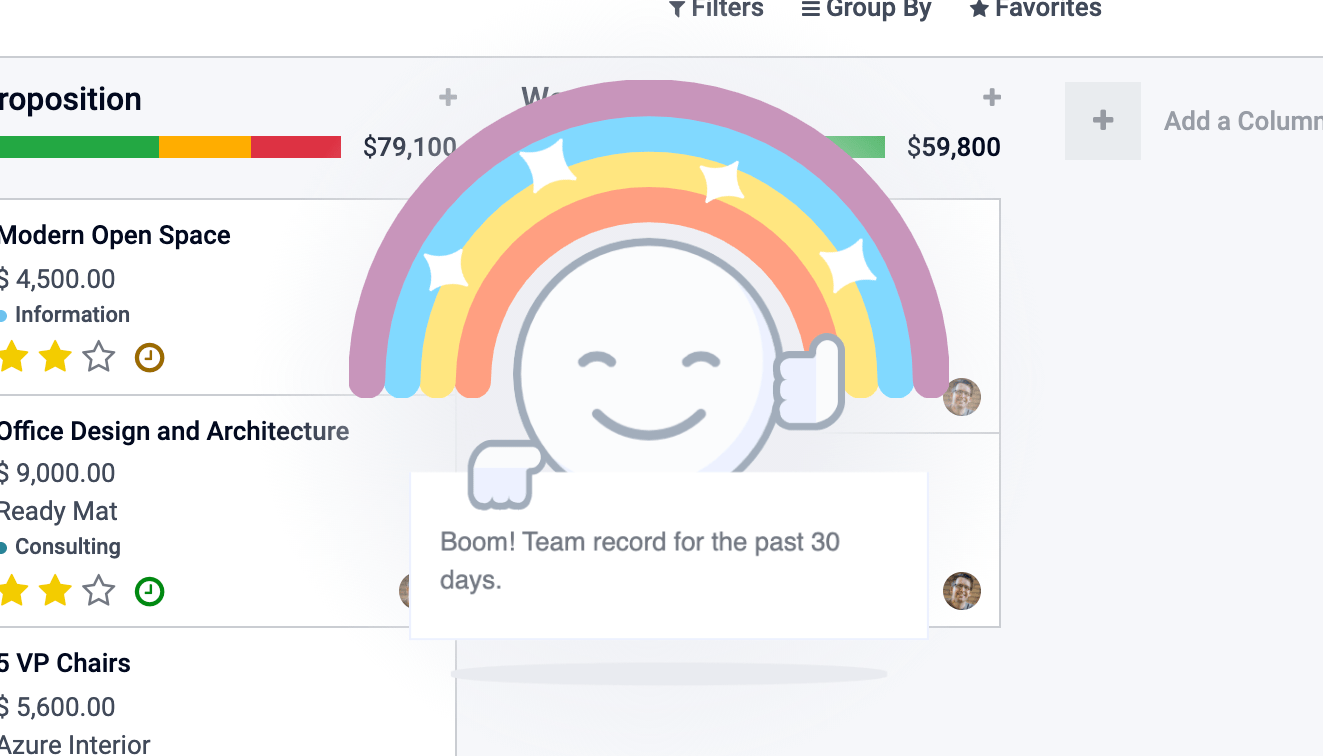
Here's how this can be displayed:
const effectService = useService("effect");
effectService.add({
  type: "rainbow_man", // can be omitted, default type is already "rainbow_man"
  message: "Boom! Team record for the past 30 days.",
});
هشدار
The hook useEffect is not related to the effect service.
API
- effectService.add(options)
- نشانوندها
options (
object()) -- the options for the effect. They will get passed along to the underlying effect component.
Display an effect.
The options are defined by:
interface EffectOptions {
  // The name of the desired effect
  type?: string;
  [paramName: string]: any;
}
Available effects
Currently, the only effect is the rainbow man.
RainbowMan
effectService.add({ type: "rainbow_man" });
نام |
نوع |
توضیحات |
|---|---|---|
|
|
Component class to instantiate inside the RainbowMan (will replace the message). |
|
|
If params.Component is given, its props can be passed with this argument. |
|
|
Message is the notice the rainbowman holds. If effects are disabled for the user, the rainbowman won't appear and a simple notification will get displayed as a fallback. If effects are enabled and params.Component is given, params.message is not used. The message is a simple string or a string representing html (prefer using params.Component if you want interactions in the DOM). |
|
|
Set to true if the message represents html, s.t. it will be correctly inserted into the DOM. |
|
|
The url of the image to display inside the rainbow. |
|
|
Delay for rainbowman to disappear.
|
How to add an effect
The effects are stored in a registry called effects.
You can add new effects by providing a name and a function.
const effectRegistry = registry.category("effects");
effectRegistry.add("rainbow_man", rainbowManEffectFunction);
The function must follow this API:
- <newEffectFunction>(env, params)
- نشانوندها
env (
Env()) -- the environment received by the serviceparams (
object()) -- the params received from the add function on the service.
- بازگشت ها
({Component, props} | void)A component and its props or nothing.
This function must create a component and return it. This component is mounted inside the effect component container.
مثال
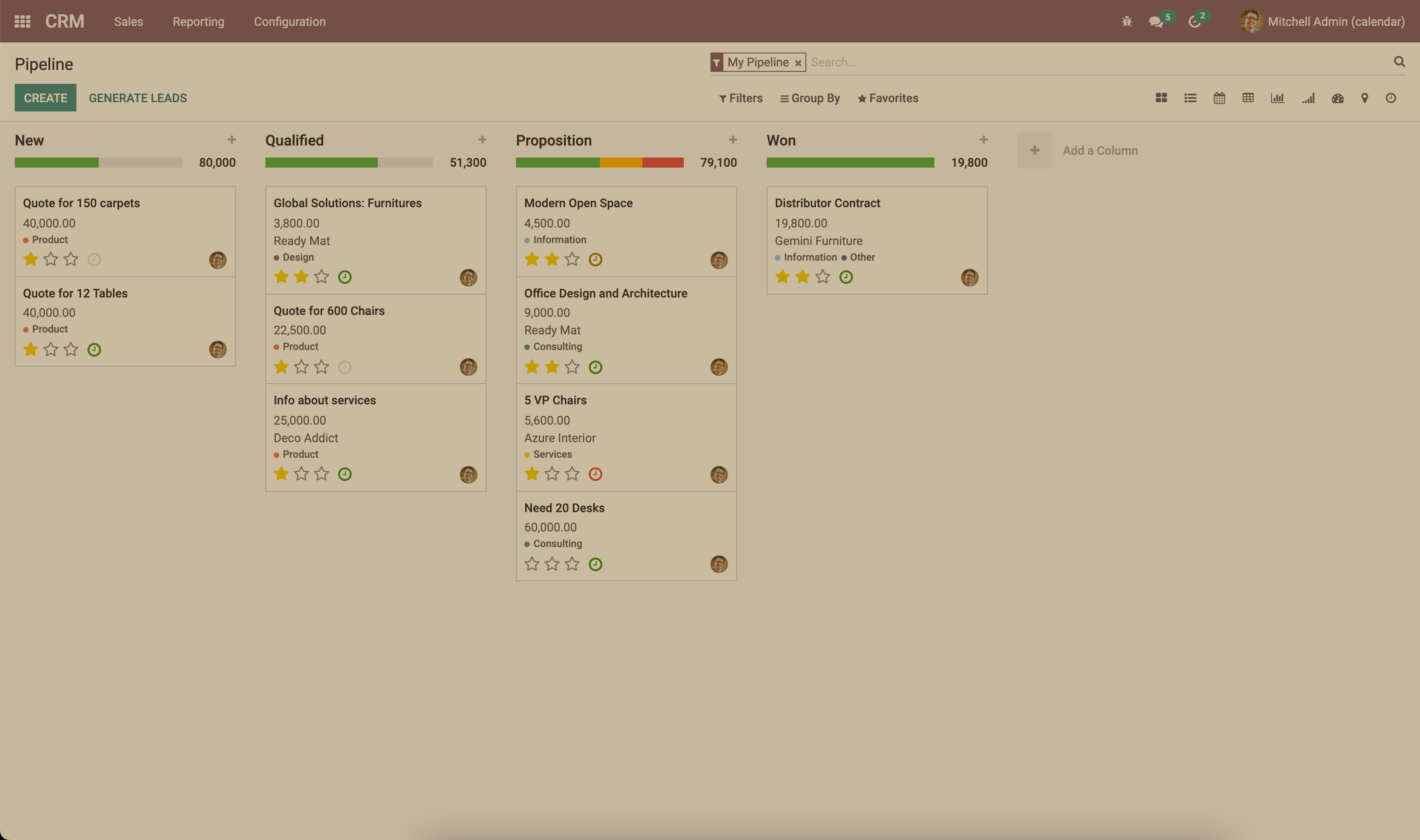
Let's say we want to add an effect that add a sepia look at the page.
import { registry } from "@web/core/registry";
import { Component, xml } from "@odoo/owl";

class SepiaEffect extends Component {
  static template = xml`
    <div style="
        position: absolute;
        left: 0;
        top: 0;
        width: 100%;
        height: 100%;
        pointer-events: none;
        background: rgba(124,87,0, 0.4);
    "></div>
  `;
}

export function sepiaEffectProvider(env, params = {}) {
    return {
        Component: SepiaEffect,
    };
}

const effectRegistry = registry.category("effects");
effectRegistry.add("sepia", sepiaEffectProvider);
And then, call it somewhere you want and you will see the result. Here, it is called in webclient.js to make it visible everywhere for the example.
const effectService = useService("effect");
effectService.add({ type: "sepia" });
Http Service
نمای کلی
Technical name:
httpDependencies: None
While most interactions between the client and the server in odoo are RPCs (XMLHTTPRequest), lower level
control on requests may sometimes be required.
This service provides a way to send get and post http requests.
API
- async get(route[, readMethod = "json"])
- نشانوندها
route (
string()) -- the url to send the request toreadMethod (
string()) -- the response content type. Can be "text", "json", "formData", "blob", "arrayBuffer".
- بازگشت ها
the result of the request with the format defined by the readMethod argument.
Sends a get request.
- async post(route[, params = {}, readMethod = "json"])
- نشانوندها
route (
string()) -- the url to send the request toparams (
object()) -- key value data to be set in the form data part of the requestreadMethod (
string()) -- the response content type. Can be "text", "json", "formData", "blob", "arrayBuffer".
- بازگشت ها
the result of the request with the format defined by the readMethod argument.
Sends a post request.
مثال
const httpService = useService("http");
const data = await httpService.get("https://something.com/posts/1");
// ...
await httpService.post("https://something.com/posts/1", { title: "new title", content: "new content" });
Notification service
نمای کلی
Technical name:
notificationDependencies: None
The notification service allows to display notifications on the screen.
const notificationService = useService("notification");
notificationService.add("I'm a very simple notification");
API
- add(message[, options])
- نشانوندها
message (
string()) -- the notification message to displayoptions (
object()) -- the options of the notification
- بازگشت ها
a function to close the notification
Shows a notification.
The options are defined by:
نام
نوع
توضیحات
titlestring
Add a title to the notification
typewarning|danger|success|infoChanges the background color according to the type
stickyبولی
Whether or not the notification should stay until dismissed
classNamestring
additional css class that will be added to the notification
onClosefunction
callback to be executed when the notification closes
buttonsbutton[] (see below)
list of button to display in the notification
autocloseDelayعدد
duration in milliseconds before the notification is closed automatically
The buttons are defined by:
نام
نوع
توضیحات
namestring
The button text
onClickfunction
callback to execute when the button is clicked
primaryبولی
whether the button should be styled as a primary button
مثالها
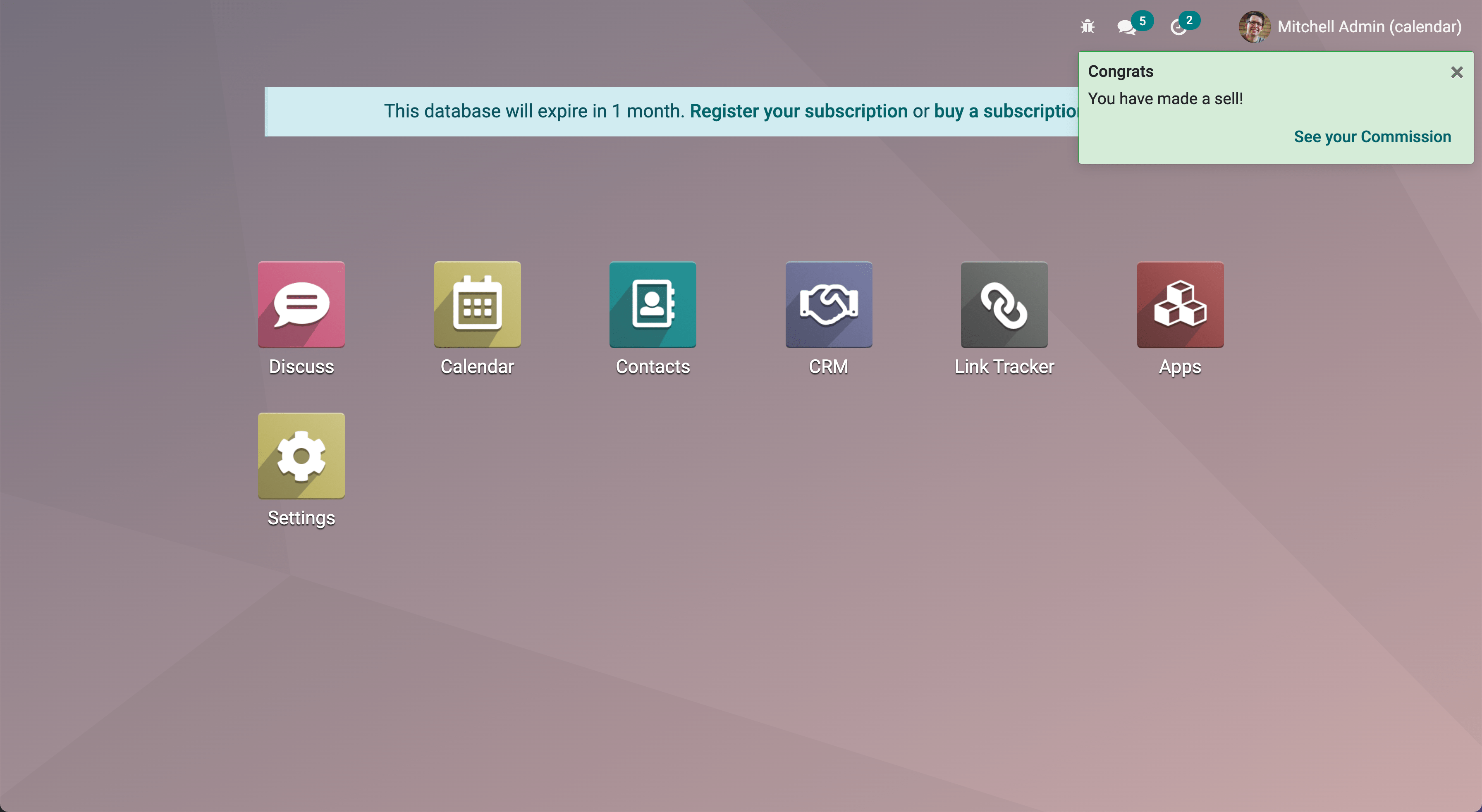
A notification for when a sale deal is made with a button to go some kind of commission page.
// in setup
this.notificationService = useService("notification");
this.actionService = useService("action");

// later
this.notificationService.add("You closed a deal!", {
  title: "Congrats",
  type: "success",
  buttons: [
      {
          name: "See your Commission",
          onClick: () => {
              this.actionService.doAction("commission_action");
          },
      },
  ],
});
A notification that closes after a second:
const notificationService = useService("notification");
const close = notificationService.add("I will be quickly closed");
setTimeout(close, 1000);
Router Service
نمای کلی
Technical name:
routerDependencies: none
The router service provides three features:
information about the current route
a way for the application to update the url, depending on its state
listens to every hash change, and notifies the rest of the application
API
- current
The current route can be accessed with the
currentkey. It is an object with the following information:pathname (string): the path for the current location (most likely/web)search (object): a dictionary mapping each search keyword (the querystring) from the url to its value. An empty string is the value if no value was explicitely givenhash (object): same as above, but for values described in the hash.
برای مثال:
// url = /web?debug=assets#action=123&owl&menu_id=174
const { pathname, search, hash } = env.services.router.current;
console.log(pathname); //   /web
console.log(search); //   { debug="assets" }
console.log(hash); //   { action:123, owl: "", menu_id: 174 }
Updating the URL is done with the pushState method:
- pushState(hash: object[, replace?: boolean])
- نشانوندها
hash (
Object()) -- object containing a mapping from some keys to some valuesreplace (
boolean()) -- if true, the url will be replaced, otherwise only key/value pairs from thehashwill be updated.
Updates the URL with each key/value pair from the
hashobject. If a value is set to an empty string, the key is added to the url without any corresponding value.If true, the
replaceargument tells the router that the url hash should be completely replaced (so values not present in thehashobject will be removed).This method call does not reload the page. It also does not trigger a
hashchangeevent, nor aROUTE_CHANGEin the main bus. This is because this method is intended to only updates the url. The code calling this method has the responsibility to make sure that the screen is updated as well.
برای مثال:
// url = /web#action_id=123
routerService.pushState({ menu_id: 321 });
// url is now /web#action_id=123&menu_id=321
routerService.pushState({ yipyip: "" }, replace: true);
// url is now /web#yipyip
Finally, the redirect method will redirect the browser to a specified url:
- redirect(url[, wait])
- نشانوندها
url (
string()) -- a valid urlwait (
boolean()) -- اگر true باشد، تا آماده شدن سرور صبر کرده و سپس تغییر مسیر میدهد.
مرورگر را به
urlهدایت میکند. این متد صفحه را بارگذاری مجدد میکند. آرگومانwaitبهندرت استفاده میشود: در مواردی مفید است که میدانیم سرور برای مدت کوتاهی در دسترس نخواهد بود، معمولاً درست پس از یک عملیات بهروزرسانی یا نصب افزونه.
توجه
سرویس مسیریاب هر زمان که مسیر فعلی تغییر کند، یک رویداد ROUTE_CHANGE را روی گذرگاه اصلی منتشر میکند.
سرویس RPC
نمای کلی
نام فنی:
rpcDependencies: none
سرویس rpc یک تابع ناهمگام منفرد برای ارسال درخواستها به سرور فراهم میکند. فراخوانی یک کنترلکننده بسیار ساده است: مسیر باید آرگومان اول باشد و بهصورت اختیاری، یک شیء params میتواند بهعنوان آرگومان دوم داده شود.
import { rpc } from "@web/core/network/rpc";

 // somewhere else, in an async function:
 const result = await rpc("/my/route", { some: "value" });
توجه
توجه داشته باشید که سرویس rpc یک سرویس سطح پایین محسوب میشود. تنها باید برای تعامل با کنترلکنندههای Odoo استفاده شود. برای کار با مدلها (که بهمراتب مهمترین مورد کاربرد است)، باید بهجای آن از سرویس orm استفاده شود.
API
- rpc(route, params, settings)
- نشانوندها
route (
string()) -- مسیر هدفگرفتهشده توسط درخواستparams (
Object()) -- (اختیاری) پارامترهای ارسالشده به سرورsettings (
Object()) -- (اختیاری) تنظیمات درخواست (به ادامه مراجعه کنید)
شیء
settingsمیتواند شامل موارد زیر باشد:xhrکه باید یک شیءXMLHTTPRequestباشد. در این حالت، متدrpcبهجای ایجاد یک شیء جدید، صرفاً از همان استفاده میکند. این مورد زمانی مفید است که به ویژگیهای پیشرفته APIXMLHTTPRequestدسترسی پیدا میکنید.silent (boolean)در صورت تنظیم رویtrue، وبکلاینت بازخوردی مبنی بر وجود یک rpc در انتظار ارائه نخواهد داد.
سرویس rpc با استفاده از یک شیء XMLHTTPRequest با سرور ارتباط برقرار میکند که برای کار با نوع محتوای application/json پیکربندی شده است. بنابراین واضح است که محتوای درخواست باید قابل سریالسازی به JSON باشد. هر درخواستی که این سرویس انجام میدهد از متد HTTP POST استفاده میکند.
خطاهای سرور درواقع پاسخ را با کد HTTP 200 برمیگردانند. اما سرویس rpc آنها را بهعنوان خطا تلقی میکند.
مدیریت خطا
یک rpc میتواند به دو دلیل اصلی ناموفق باشد:
یا سرور Odoo یک خطا برمیگرداند (ما به این مورد یک خطای
serverمیگوییم). در این حالت، درخواست HTTP با کد HTTP 200 برمیگردد اما با یک شیء پاسخ شامل کلیدerror.یا نوع دیگری از خطای شبکه رخ داده است
زمانی که یک rpc ناموفق باشد:
promise نمایانگر rpc رد میشود، بنابراین کد فراخواننده از کار میافتد، مگر اینکه وضعیت را مدیریت کند
یک رویداد
RPC_ERRORروی گذرگاه اپلیکیشن اصلی فعال میشود. payload رویداد شامل توصیفی از علت خطا است:اگر یک خطای سرور باشد (کد سرور یک استثنا پرتاب کرده است). در این حالت payload رویداد یک شیء با کلیدهای زیر خواهد بود:
type = 'server'message(string)code(number)name(string)(اختیاری، توسط سرویس خطا برای یافتن یک دیالوگ مناسب جهت استفاده هنگام مدیریت خطا به کار میرود)subType(string)(اختیاری، اغلب برای تعیین عنوان دیالوگ استفاده میشود)data(object)(شیء اختیاری که میتواند شامل کلیدهای مختلفی باشد که در میان آنهاdebugقرار دارد: اطلاعات اصلی اشکالزدایی، همراه با پشتهٔ فراخوانی)
اگر یک خطای شبکه باشد، توصیف خطا صرفاً شیء
{type: 'network'}است. هنگام بروز خطای شبکه، یک اعلان نمایش داده میشود و بهطور منظم تا زمانی که سرور پاسخ دهد با آن تماس گرفته میشود. اعلان به محض پاسخدهی سرور بسته میشود.
سرویس Scroller
نمای کلی
نام فنی:
scrollerDependencies: none
هر زمان که کاربر روی یک anchor در وبکلاینت کلیک کند، این سرویس بهطور خودکار به سمت هدف اسکرول میکند (در صورت مناسب بودن).
این سرویس یک event listener اضافه میکند تا click`ها روی document را دریافت کند. سرویس بررسی میکند که آیا selector موجود در ویژگی href آن معتبر است یا خیر تا anchorها و اکشنهای Odoo را تشخیص دهد (مثلاً `<a href="#target_element"></a>). اگر چنین نباشد، کاری انجام نمیدهد.
اگر بهنظر برسد کلیک به یک عنصر هدفگیری شده، یک رویداد SCROLLER:ANCHOR_LINK_CLICKED روی گذرگاه اصلی اپلیکیشن فعال میشود. این رویداد شامل یک رویداد سفارشی است که element منطبق و id آن را بهعنوان مرجع در بر دارد. این کار ممکن است به سایر بخشها اجازه دهد رفتاری مرتبط با خود anchorها را مدیریت کنند. رویداد اصلی نیز ارائه میشود چرا که ممکن است نیاز به جلوگیری از آن باشد. اگر از رویداد جلوگیری نشود، رابط کاربری به عنصر هدف اسکرول میکند.
API
مقادیر زیر در رویداد سفارشی anchor-link-clicked که در بالا توضیح داده شد قرار دارند.
نام |
نوع |
توضیحات |
|---|---|---|
|
|
عنصر anchor که توسط href هدف قرار گرفته است |
|
|
id موجود در href |
|
|
رویداد کلیک اصلی |
توجه
سرویس scroller یک رویداد SCROLLER:ANCHOR_LINK_CLICKED را روی گذرگاه اصلی منتشر میکند. برای جلوگیری از رفتار اسکرول پیشفرض سرویس scroller، باید از preventDefault() روی رویداد ارسالشده به listener استفاده کنید تا بتوانید رفتار خود را بهدرستی از داخل listener پیادهسازی نمایید.
سرویس Title
نمای کلی
نام فنی:
titleDependencies: none
سرویس title یک API ساده ارائه میدهد که اجازهٔ خواندن/تغییر عنوان document را میدهد. بهعنوان مثال، اگر عنوان document فعلی "Odoo" باشد، میتوانیم با استفاده از دستور زیر آن را به "Odoo 15 - Apple" تغییر دهیم:
// in some component setup method
const titleService = useService("title");

titleService.setParts({ odoo: "Odoo 15", fruit: "Apple" });
API
سرویس title رابط زیر را دستکاری میکند:
interface Parts {
    [key: string]: string | null;
}
هر کلید نشاندهندهٔ هویت بخشی از عنوان است و هر مقدار رشتهای است که نمایش داده میشود، یا null اگر حذف شده باشد.
API آن اینگونه است:
- current
این یک رشته است که نشاندهندهٔ عنوان فعلی است. به شیوهٔ زیر ساختاربندی شده است:
value_1 - ... - value_nکه هرvalue_iیک مقدار (غیر null) موجود در شیءPartsاست (که توسط تابعgetPartsبازگردانده میشود)
- getParts()
- بازگشت ها
Parts شیء
Partsفعلی که توسط سرویس title نگهداری میشود
- setParts(parts)
- نشانوندها
parts (
Parts()) -- شیء نشاندهندهٔ تغییر موردنیاز
متد
setPartsاجازه میدهد چندین بخش از عنوان را افزود/جایگزین/حذف کرد. حذف یک بخش (یک مقدار) با تنظیم مقدار کلید مرتبط رویnullانجام میشود.توجه داشته باشید که میتوان تنها یک بخش را بدون تأثیرگذاری بر سایر بخشها تغییر داد. بهعنوان مثال، اگر عنوان از بخشهای زیر تشکیل شده باشد:
{ odoo: "Odoo", action: "Import" }
با مقدار
currentبرابر باOdoo - Import، آنگاهsetParts({ action: null, });
عنوان را به
Odooتغییر خواهد داد.
سرویس User
نمای کلی
نام فنی:
userوابستگیها:
rpc
سرویس user مجموعهای از دادهها و چند تابع کمکی مرتبط با کاربر متصل را فراهم میکند.
API
نام |
نوع |
توضیحات |
|---|---|---|
|
|
|
|
|
اطلاعات دربارهٔ پایگاه داده |
|
|
شناسهٔ اکشن استفادهشده بهعنوان صفحهٔ اصلی برای کاربر |
|
|
اینکه آیا کاربر یک مدیر است (گروه |
|
|
اینکه آیا کاربر بخشی از گروه سیستمی ( |
|
|
زبان مورد استفاده |
|
|
نام کاربر |
|
|
شناسهٔ نمونهٔ شریک مربوط به کاربر |
|
|
منطقهٔ زمانی کاربر |
|
|
شناسهٔ کاربر |
|
|
نام مستعار جایگزین کاربر |
- updateContext(update)
- نشانوندها
update (
object()) -- شیئی که کانتکست با آن بهروزرسانی میشود
کانتکست کاربر را با شیء دادهشده بهروزرسانی میکند.
userService.updateContext({ isFriend: true })
- removeFromContext(key)
- نشانوندها
key (
string()) -- کلید ویژگی هدفگرفتهشده
مقدار را با کلید دادهشده از کانتکست کاربر حذف میکند
userService.removeFromContext("isFriend")
- hasGroup(group)
- نشانوندها
group (
string()) -- xml_id گروهی که باید جستوجو شود
- بازگشت ها
Promise<boolean>آیا کاربر در گروه قرار دارد
بررسی میکند که آیا کاربر بخشی از یک گروه است یا خیر
const isInSalesGroup = await userService.hasGroup("sale.group_sales")