
API خارجی JSON-2
جدید در نسخه 19.0.
Odoo معمولاً بهصورت داخلی از طریق ماژولها گسترش مییابد، اما بسیاری از ویژگیهای آن و همهٔ دادههای آن نیز بهصورت خارجی برای تجزیه و تحلیل یا ادغام با نرمافزارهای دیگر در دسترس است. بخشی از API مدلها بهراحتی از طریق HTTP از طریق نقطهٔ پایانی /json/2 در دسترس است.
نکته
مدلها، فیلدها و متدهای واقعی موجود مختص هر پایگاه داده هستند و میتوان آنها را در صفحهٔ /doc آنها مشاهده کرد.
توجه
دسترسی به داده از طریق API خارجی فقط در طرحهای قیمتگذاری Custom Odoo در دسترس است. دسترسی به API خارجی در طرحهای One App Free یا Standard در دسترس نیست. برای اطلاعات بیشتر به صفحهٔ قیمتگذاری Odoo مراجعه کنید یا با مدیر موفقیت مشتری خود تماس بگیرید.
API
درخواست
یک شیء JSON را در URL /json/2/<model>/<method> پست کنید.
سرآیندهای HTTP
- میزبان
الزامی، نام میزبان سرور.
- Authorization
الزامی،
bearerبه دنبال یک کلید API.- Content-Type
الزامی،
application/json، یک charset توصیه میشود.- X-Odoo-Database
اختیاری، نام پایگاه دادهای که باید به آن متصل شود.
- User-Agent
Recommended, the name of your software.
مسیر URL
- model
Required, the technical model name.
- method
Required, the method to execute.
آبجکت JSON بدنه
- ids
An array of record ids on which to execute the method. Empty or omitted when calling an
@api.model-decorated method.- context
Optional, an object of additional values. e.g.
{"lang": "en_US"}.- پارامتر
As many time as needed, the method's parameters.
Example
POST /json/2/res.partner/search_read HTTP/1.1
Host: mycompany.example.com
X-Odoo-Database: mycompany
Authorization: bearer 6578616d706c65206a736f6e20617069206b6579
Content-Type: application/json; charset=utf-8
User-Agent: mysoftware python-requests/2.25.1

{
    "context": {
        "lang": "en_US"
    },
    "domain": [
        ["name", "ilike", "%deco%"],
        ["is_company", "=", true]
    ],
    "fields": ["name"]
}
پاسخ
In case of success, a 200 status with the JSON-serialized return value of the called method in the body.
Example
HTTP/1.1 200 OK
Content-Type: application/json; charset=utf-8

[
   {"id": 25, "name": "Deco Addict"}
]
In case of error, a 4xx/5xx status with a JSON-serialized error object in the body.
- name
The fully qualified name of the Python exception that occured.
- message
The exception message, usually the same as
arguments[0].- arguments
All the exception arguments.
- context
The context used by the request.
- debug
The exception traceback, for debugging purpose.
Example
HTTP/1.1 401 Unauthorized
Content-Type: application/json; charset=utf-8

{
  "name": "werkzeug.exceptions.Unauthorized",
  "message": "Invalid apikey",
  "arguments": ["Invalid apikey", 401],
  "context": {},
  "debug": "Traceback (most recent call last):\n  File \"/opt/Odoo/community/odoo/http.py\", line 2212, in _transactioning\n    return service_model.retrying(func, env=self.env)\n  File \"/opt/Odoo/community/odoo/service/model.py\", line 176, in retrying\n    result = func()\n  File \"/opt/Odoo/community/odoo/http.py\", line 2177, in _serve_ir_http\n    self.registry['ir.http']._authenticate(rule.endpoint)\n  File \"/opt/Odoo/community/odoo/addons/base/models/ir_http.py\", line 274, in _authenticate\n    cls._authenticate_explicit(auth)\n  File \"/opt/Odoo/community/odoo/addons/base/models/ir_http.py\", line 283, in _authenticate_explicit\n    getattr(cls, f'_auth_method_{auth}')()\n  File \"/opt/Odoo/community/odoo/addons/base/models/ir_http.py\", line 240, in _auth_method_bearer\n    raise werkzeug.exceptions.Unauthorized(\nwerkzeug.exceptions.Unauthorized: 401 Unauthorized: Invalid apikey\n"
}
Traceback (most recent call last):
  File "/opt/Odoo/community/odoo/http.py", line 2212, in _transactioning
    return service_model.retrying(func, env=self.env)
  File "/opt/Odoo/community/odoo/service/model.py", line 176, in retrying
    result = func()
  File "/opt/Odoo/community/odoo/http.py", line 2177, in _serve_ir_http
    self.registry['ir.http']._authenticate(rule.endpoint)
  File "/opt/Odoo/community/odoo/addons/base/models/ir_http.py", line 274, in _authenticate
    cls._authenticate_explicit(auth)
  File "/opt/Odoo/community/odoo/addons/base/models/ir_http.py", line 283, in _authenticate_explicit
    getattr(cls, f'_auth_method_{auth}')()
  File "/opt/Odoo/community/odoo/addons/base/models/ir_http.py", line 240, in _auth_method_bearer
    raise werkzeug.exceptions.Unauthorized(
werkzeug.exceptions.Unauthorized: 401 Unauthorized: Invalid apikey
پیکربندی
API Key
An API key must be set in the Authorization request header, as a bearer token.
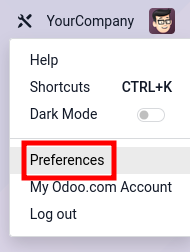
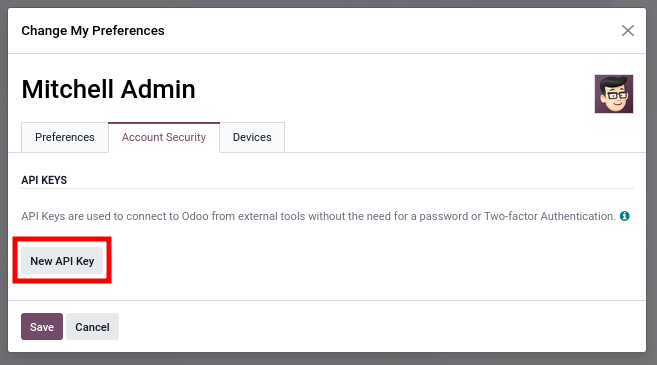
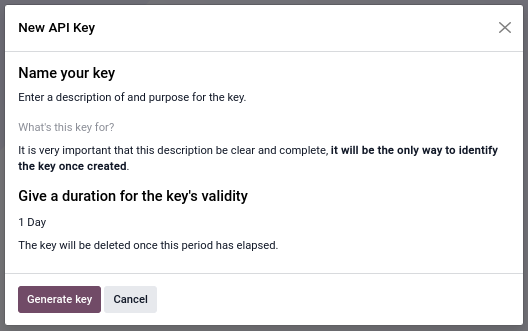
Create a new API key for a user via .
|
|
|
Both a description and a duration are needed to create a new API key. The description makes it possible to identify the key, and to determine later whether the key is still in use or should be removed. The duration determines the lifetime of the key, after which the key becomes invalid. It is recommended to set a short duration (typically one day) for interactive usage. For security reasons, it is not possible to create keys that last for more than three months. This means that long lasting keys must be rotated at least once every three months.
The Generate Key button creates a strong 160-bits random key. The key value is displayed only once during creation and cannot be retrieved later. Copy the key immediately and store it securely. If the key is compromised or lost, delete it immediately and generate a new one.
Please refer to OWASP's Secrets Management Cheat Sheet for further guidance on the management of API keys.
Access Rights
The JSON-2 API uses the standard security models of Odoo. All operations are validated against the access rights, record rules and field accesses of the user.
For interactive usage, such as discovering the API or running one-time scripts, it is fine to use a personal account.
For extended automated usage, such as an integration with another software, it is recommended to create and use dedicated bot users. Using dedicated bot users has several benefits:
The minimum required permissions can be granted to the bot, limiting the impact if the API key gets compromised.
The password can be set empty to disable login/password authentication, limiting the likelihood of the account getting compromised.
The فیلدهای لاگ دسترسی use the bot account. No user is impersonalized.
پایگاه داده
Depending on the deployment, the Host and/or X-Odoo-Database request headers might be
required. The Host header is required by HTTP/1.1 and is needed on servers where Odoo is
installed next to other web applications, so that a web-server/reverse-proxy is able to route the
request to the Odoo server. The X-Odoo-Database header is required when a single Odoo server
hosts multiple databases and the dbfilter wasn't configured to use the Host header.
Most HTTP client libraries automatically set the Host header using the connection URL.
تراکنش
All calls to the JSON-2 endpoint run in their own SQL transaction. The transaction is committed in case of success and is discarded in case of error. Using the JSON-2 API, it is not possible to chain multiple calls inside a single transaction. It means that one must be cautious when making multiple consecutive calls, as the database might be modified by other concurrent transactions. This is especially dangerous when performing operations related to reservations, payments, and such.
The solution is to always call a single method that performs all the related operations in a single transaction. This way, the data is guaranteed to stay consistent: either everything is done (success, commit), or nothing is done (error, rollback).
In the ORM, the search_read method is an example of a single method that performs multiple
operations (search then read) in a single transaction. If a concurrent request removes one
of the records search retrieves, then there is a risk that subsequent calls to read fail for
a missing record error. Such a problem cannot occur in search_read, as the system guarantees
proper isolation between transactions.
In business models, those methods are often prefixed by action_, such as
sale.order's action_confirm method, which verifies that a sales order is valid before
confirming it.
When no method exists for a set of related operations, a new one can be created in a dedicated module.
همچنین ببینید
PostgreSQL - Transaction Isolation - Repeatable Read
Code Example
The following examples showcase how to execute two of the common ORM methods on a dummy database mycompany hosted on the dummy website
https://mycompany.example.com. Its dynamic documentation would be available at https://mycompany.example.com/doc.
import requests

BASE_URL = "https://mycompany.example.com/json/2"
API_KEY = ...  # get it from a secure location
headers = {
    "Authorization": f"bearer {API_KEY}",
    "X-Odoo-Database": "mycompany",
    "User-Agent": "mysoftware " + requests.utils.default_user_agent(),
}

res_search = requests.post(
    f"{BASE_URL}/res.partner/search",
    headers=headers,
    json={
        "context": {"lang": "en_US"},
        "domain": [
            ("name", "ilike", "%deco%"),
            ("is_company", "=", True),
        ],
    },
)
res_search.raise_for_status()
ids = res_search.json()

res_read = requests.post(
    f"{BASE_URL}/res.partner/read",
    headers=headers,
    json={
        "ids": ids,
        "context": {"lang": "en_US"},
        "fields": ["name"],
    }
)
res_read.raise_for_status()
names = res_read.json()
print(names)
(async () => {
    const BASE_URL = "https://mycompany.example.com/json/2";
    const API_KEY = ;  // get it from a secure location
    const headers = {
        "Content-Type": "application/json",
        "Authorization": "bearer " + API_KEY,
        "X-Odoo-Database": DATABASE,
    }

    const reqSearch = {
        method: "POST",
        headers: headers,
        body: JSON.stringify({
            context: {lang: "en_US"},
            domain: [
                ["name", "ilike", "%deco%"],
                ["is_company", "=", true],
            ],
        }),
    };
    const resSearch = await fetch(BASE_URL + "/res.partner/search_read", reqSearch);
    if (!resSearch.ok) throw new Error(resSearch.json());
    const ids = await resSearch.json();

    const reqRead = {
        method: "POST",
        headers: headers,
        body: JSON.stringify({
            ids: ids,
            context: {lang: "en_US"},
            fields: ["name"],
        }),
    };
    const resRead = await fetch(BASE_URL + "/res.partner/search_read", reqRead);
    if (!resRead.ok) throw new Error(resRead.json());
    const names = await resRead.json();
    console.log(names);
})();
set -eu

DATABASE=mycompany
BASE_URL=https://$DATABASE.odoo.com/json/2
API_KEY=

ids=$(curl $BASE_URL/res.partner/search \
    -X POST \
    --oauth2-bearer $API_KEY \
    -H "X-Odoo-Database: $DATABASE" \
    -H "Content-Type: application/json" \
    -d '{"context": {"lang": "en_US"}, "domain": [["name", "ilike", "%deco%"], ["is_company", "=", true]]}' \
    --silent \
    --fail
)
curl $BASE_URL/res.partner/read \
    -X POST \
    --oauth2-bearer $API_KEY \
    -H "X-Odoo-Database: $DATABASE" \
    -H "Content-Type: application/json" \
    -d "{\"ids\": $ids, \"context\": {\"lang\": \"en_US\"}, \"fields\": [\"name\"]}" \
    --silent \
    --fail-with-body
The above example is equivalent to running:
Model = self.env["res.partner"].with_context({"lang": "en_US"})
records = Model.search([("name", "ilike", "%deco%"), ("is_company", "=", True)])
return json.dumps(records.ids)
Then, in a new transaction:
records = self.env["res.partner"].with_context({"lang": "en_US"}).browse(ids)
names = records.read(["name"])
return json.dumps(names)
Dynamic Documentation
Under construction
Migrating from XML-RPC / JSON-RPC
Both the XML-RPC and JSON-RPC APIs at endpoints /xmlrpc, /xmlrpc/2 and /jsonrpc are
scheduled for removal in Odoo 22 (fall 2028). Both RPC APIs expose the three same services: common,
db (database) and object. All three services are deprecated.
توجه
The other controllers @route(type='jsonrpc') (known until Odoo 18 as type='json') are not
subject to this deprecation notice.
Common service
The common service defines 3 functions:
version()login(db, login, password)authenticate(db, login, password, user_agent_env)
The version function is replaced by the /web/version endpoint.
GET /web/version HTTP/1.1
HTTP/1.1 200 OK
Content-Type: application/json

{"version_info": [19, 0, 0, "final", 0, ""], "version": "19.0"}
The two login and authenticate functions return the user ID corresponding to the user after
a successful login. The user ID and password are necessary for subsequent RPC calls to the object
service. The JSON-2 API uses a different authentication scheme where neither the user ID nor the
password are used. It is still possible to retrieve the user's own ID by sending a JSON-2 request to
res.users/context_get with no ID (the current user is extracted from the API key).
Database service
همچنین ببینید
The db service defines 13 functions:
create_database(master_pwd, db_name, demo, lang, user_password, login, country_code, phone)duplicate_database(master_pwd, db_original_name, db_name, neutralize_database)drop(master_pwd, db_name)dump(master_pwd, db_name, format)restore(master_pwd, db_name, data, copy)change_admin_password(master_pwd, new_password)rename(master_pwd, old_name, new_name)migrate_databases(master_pwd, databases)db_exist(db_name)list()list_lang()list_countries(master_pwd)server_version()
Many of those function are accessible via the /web/database controllers. Those controllers
work hand-in-hand with the HTML form at /web/database/manager and are accessible via HTTP.
The following controllers use the verb POST and content-type
application/x-www-form-urlencoded.
/web/database/createtakes inputsmaster_pwd,name,login,password,demo,lang, andphone./web/database/duplicatetakes inputsmaster_pwd,name,new_name, andneutralize_database(not neutralized by default)./web/database/droptakes inputsmaster_pwdandname./web/database/backuptakes inputsmaster_pwd,name, andbackup_format(zip by default), and returns the backup in the http response./web/database/change_passwordtakes inputsmaster_pwdandmaster_pwd_new.
The following controller uses the verb POST and content-type multipart/form-data.
/web/database/restoretakes inputsmaster_pwd,name,copy(not copied by default) andneutralize(not neutralized by default), it takes a file inputbackup_file.
The following controller uses the verb POST and content-type application/json-rpc.
/web/database/listtakes an empty JSON object as input, and returns the database list under the JSON response'sresultentry.
The remaining function are: server_version, which exists under /web/version, list_lang,
and list_countries, which exist via JSON-2 on the res.lang and res.country models, and
migrate_databases, which as non-programmable API at the moment.
Object service
The object service defines 2 functions:
execute(db, uid, passwd, model, method, *args)execute_kw(db, uid, passwd, model, method, args, kw={})
They both give for access to all public model methods, including the generic ORM ones.
Both functions are stateless. It means that the database, user ID and user password are to be
provided for each call. The model, method and arguments must be provided, too. The execute
function takes as many extra positional arguments as necessary. The execute_kw function takes an
args list of positional arguments and an optional kw dict of keyword arguments.
The records IDs are extracted from the first args. When the called method is decorated with
@api.model, no record ID is extracted, and args is left as-is. It is only possible to give a
context with execute_kw, as it is extracted from the keyword argument named context.
Example
To run the following:
(env['res.partner']
    .with_user(2)  # admin
    .with_context(lang='en_US')
    .browse([1, 2, 3])
    .read(['name'], load=None)
)
Using XML-RPC (JSON-RPC would be similar):
from xmlrpc.client import ServerProxy
object = ServerProxy(...)
ids = [1, 2, 3]
fields = ['name']
load = None

object.execute("database", 2, "admin", "res.partner", "read", ids, fields, load)
object.execute("database", 2, "admin", "res.partner", "search", [
    ids,
    fields,
], {
    "context": {"lang": "en_US"},
    "load": load,
})
The JSON-2 API replaces the object service with a few differences. The database must only be
provided (via the X-Odoo-Database HTTP header) on systems where there are multiple databases
available for a same domain. The login/password authentication scheme is replaced by an API key (via
the Authorization: bearer HTTP header). The model and method are placed in the URL. The
request body is a JSON object with all the methods arguments, plus ids and context. All
the arguments are named; there is no way in JSON-2 to call a function with positional arguments.
Example
Using JSON-2:
import requests

DATABSE = ...
DOMAIN = ...
API_KEY = "6578616d706c65206a736f6e20617069206b6579"

requests.post(
    f"https://{DOMAIN}/json/2/res.partner/read",
    headers={
        # "X-Odoo-Database": DATABASE,  # only when DOMAIN isn't enough
        "Authorization": f"bearer {API_KEY}",
    },
    json={
        "ids": [1, 2, 3],
        "context": {"lang": "en_US"},
        "fields": ["name"],
        "load": None,
    },
).json()